PC App Store: what falls under "technical data"?
TL;DR: PC App Store is classified as a Deceptor, adware and PUA from various popular and trusted Anti-malware software vendors. It collects extensive amount of data (printers, installed physical devices, running processes and their filepaths, browser extensions...), heartbeats go to a Cloudfront host. All collected info is tied to a unique identifier called guid. Hashes for the same version executable download vary, therefore often the setup that the user downloads is unknown to sandboxes/VirusTotal. Terms of Service also prohibit any attempt of reverse engineering or analysis on their software.
Many users claim unwanted behavior, such as popup displaying or being installed without their knowledge and consent.
What is PC App Store?
PC App Store is a legitimate application that allows easy access to various software vendors. However, while this is a genuine piece of software – there are no guarantees that the content advertised through it will not have undesirable features, such as data tracking.
Furthermore, PC App Store can be installed onto systems without user knowledge by a bundled installation setup, which may also contain unwanted or harmful software (e.g., adware, browser hijackers, PUAs, etc.).
https://www.pcrisk.com/removal-guides/8957-pc-app-store-adware
Terms of Service, Privacy Policy
Before we dive into the network logs (careful, we did not reverse engineer anything), we need to do some boring digging into their TOS and privacy policy.
On sites:
- https[:]//pcapp[.]store/?p=lp_tos
- https[:]//pcapp[.]store/?p=lp_privacy
we can figure out they collect the following:
We collect the following Personal Information about you: (i) Registration data: your name, address, your email address, your age range and payment details; (ii) When using our Services: our webserver will collect your IP address and machine GUID; (iii) Information from third parties: in order to provide our Services, we may receive Personal Information from our business partners, this may include Personal Information such as your contact details (name, phone, email) as well as details pertaining to your company, your job, your activities and publications; and (iv) Data provided voluntarily by you: in order to improve our services and develop additional tools and services, you may provide us additional information such as personal contact information, prompts to our search features, open language feedback (written or otherwise).
We may collect the following non-personal Information: (i) Technical data: this category includes data such as website visits, the browser you are using and its display settings, your operating system, device type, session start/stop time, time zone, network connection type (e.g., Wi-Fi, cellular), cookie data and your general location (city and country). This technical collection includes metadata related to your computer specifications and configurations, as well as software preferences and performance metrics, analyzed for the purpose of improving the Services and optimizing product delivery; (ii) Data from third parties: this category includes data we receive from our business partners. This may include pseudonymous advertiser identifiers that some advertisers or other third-party ad platforms choose to share with us. This data is also used to enhance data points about a particular unique browser or device; and (iii) Organizational Data (If applicable): If you access or use the Services on behalf of an organization (such as a company or entity, as described in the Terms), we may collect and process additional Personal Information necessary to establish and maintain that organizational relationship. This may include details pertaining to your company, your job title, and your activities as an organizational representative.
In the next section, I am going to show you a specific example of what might fall under "technical data".
Network logs analysis
We are going to be working with a Windows 10 Hyper-V Virtual environment and the application Fiddler. Fiddler is able to intercept, modify and view HTTP/S traffic coming from our VM - perfect for us in this scenario.
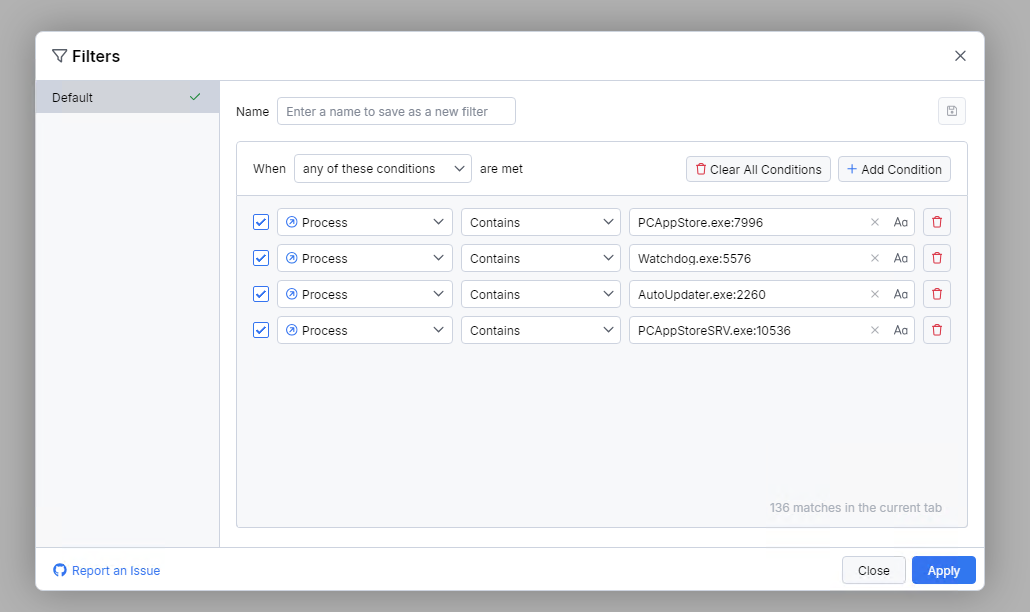
Let's start by filtering our traffic in Fiddler to the 4 main processes that PCAS uses by setting up their filenames and PID's so we can avoid unnecessary noise from other processes.
Essentially, every move (starting their menu, downloading an application, closing the menu...) is monitored and sent to their domain pcapp.store:
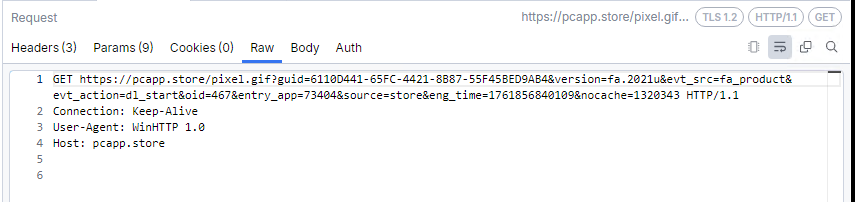
- The
pixel.gifis a telemetry beacon here guidis a unique identifier for every deviceversionis an identifier for the software versionevt_srcis used to determine what process caused this request; here it was caused by the main application, however we also saw use ofwatch_dog,fa_uninstaller...evt_actionis the action identifier, here we started a software download, so the action isdl_startoidis the internal download IDentry_appis the application ID in their softwareeng_timeis surprisingly the time...nocacheis request to not cache the request.
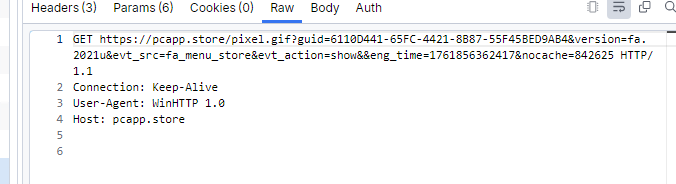 This is the generic menu display request.
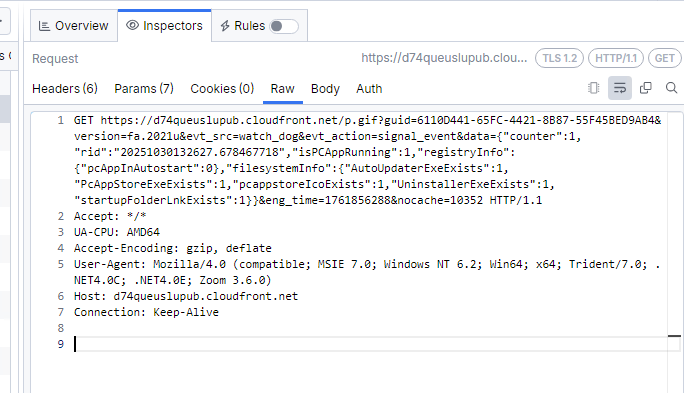 This is a request to
 https[:]//d74queuslupub[.]cloudfront[.]net/ indicating a classic heartbeat and basic checks if it is running, if it is set up to autorun and whether all of it's important files (autoupdater, main executable, icon, uninstaller executable) exist.
So far, it was pretty straight forward and nothing too interesting. It is understandable that the application owner may want to know on how frequently people use it and what sections of the app specifically.
The more "spicy" info comes to the URL ev.pcapp[.]store with the telemetry beacon called p.gif. The app usage info, heartbearts all were to the pixel.gif beacon.
So, let's get into it:
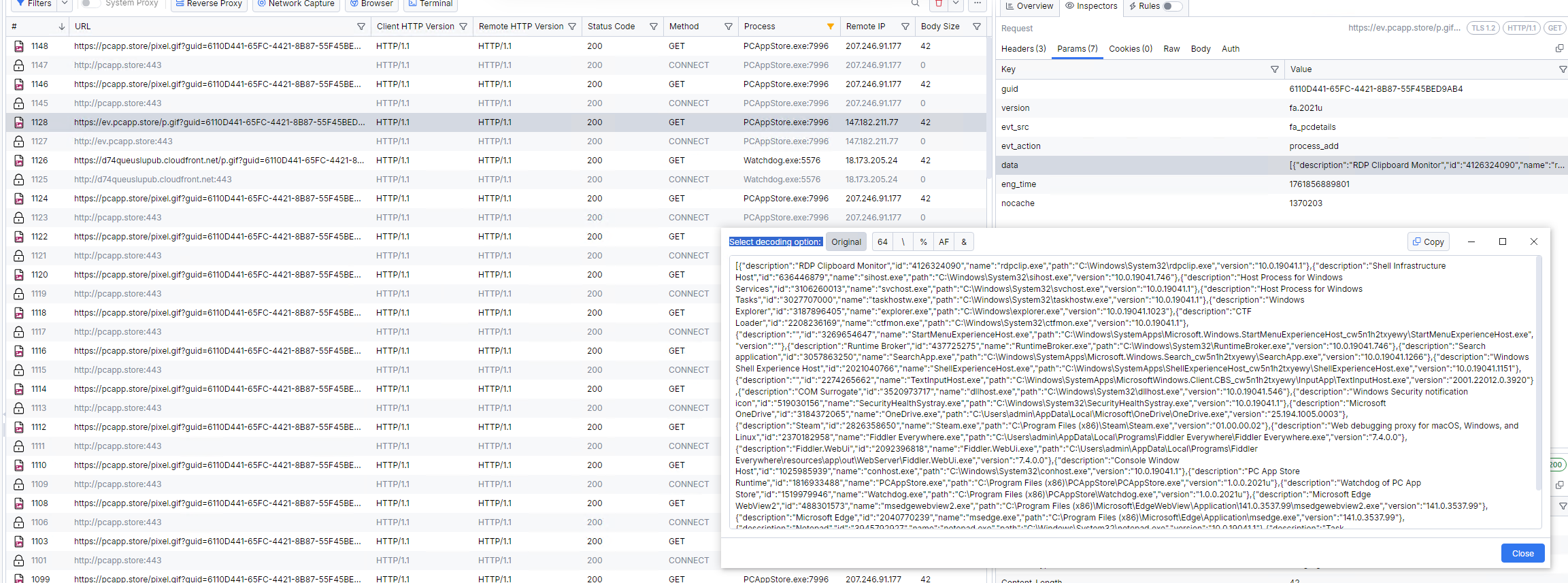 Here we have process filepaths, versions, descriptions and ID's. Keep in mind, those are all sent using our unique identifier
 guid and with the parameter process_add. That being said, it is likely possible someone could just enter the guid of my VM and view all of these info at once.
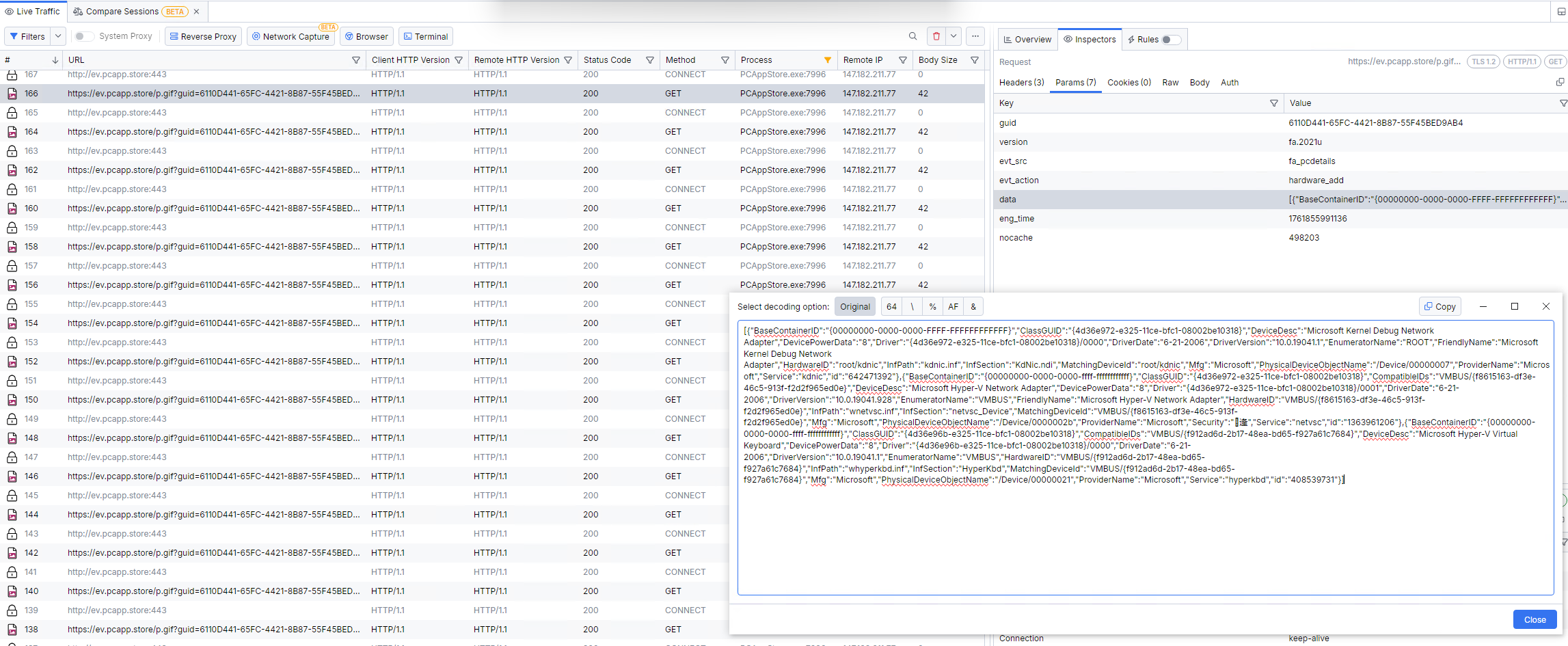 Here we can see bunch of information about the connected hardware. It is obvious from this log that this is a Hyper-V VM, yet we don't see an AntiVM mechanism, which is honestly surprising to me.
We can see some network adapters, drivers, physical devices, printers and more.
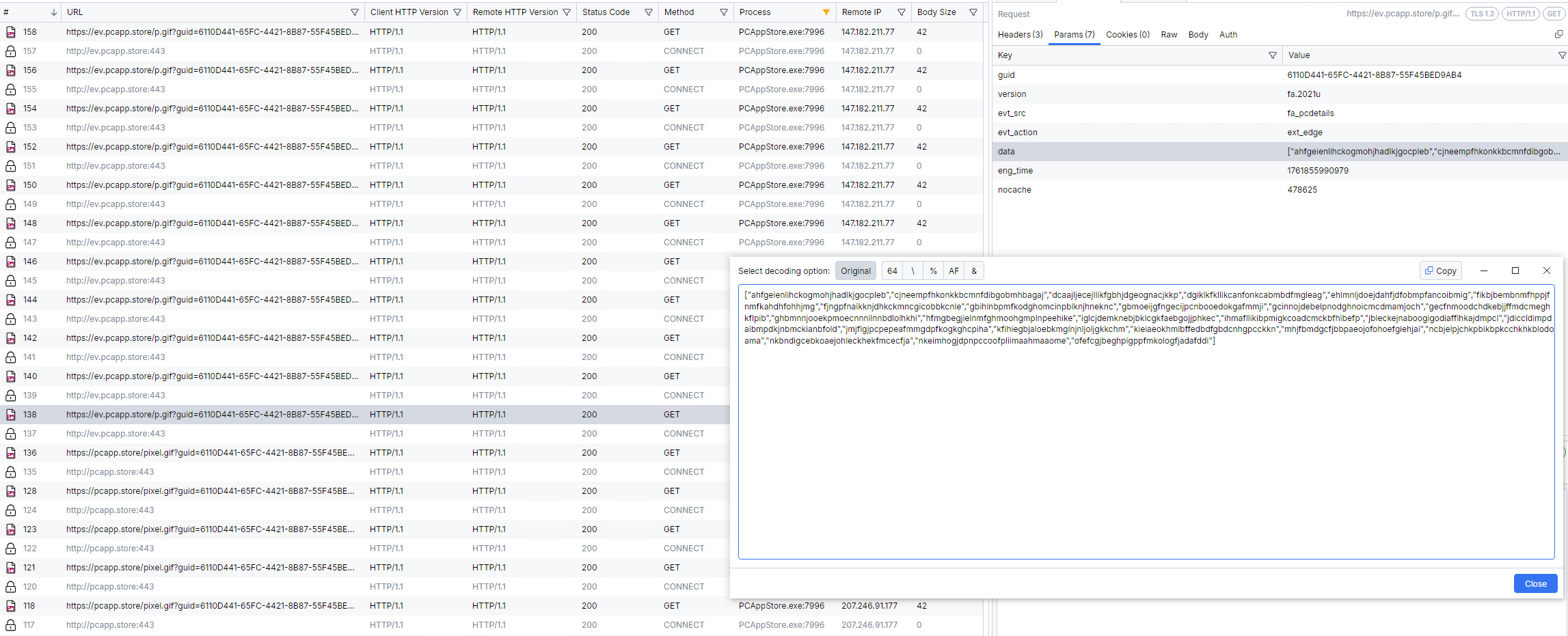 We can see browser extensions here as well.
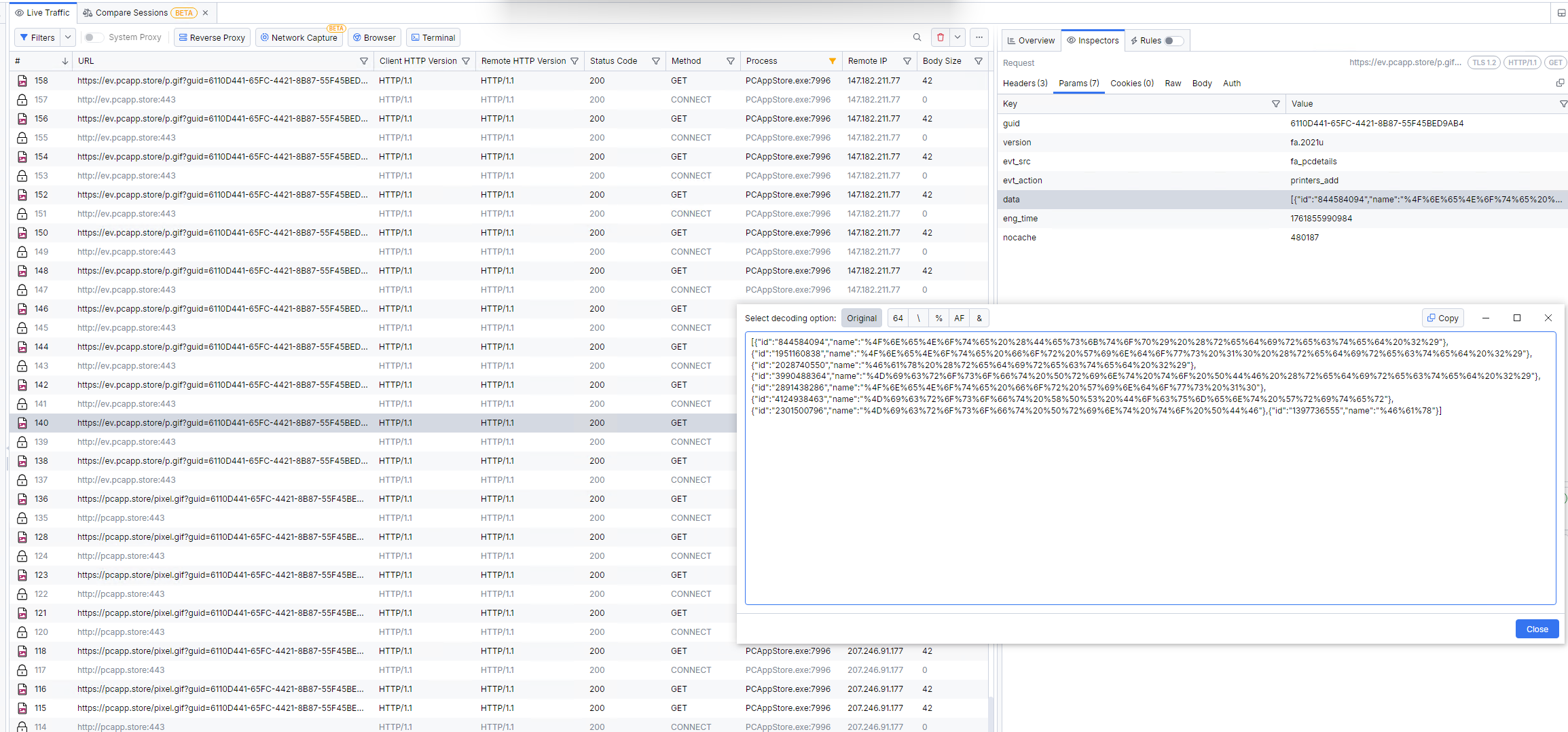 URL-encoded printer list, as seen when decoded below:
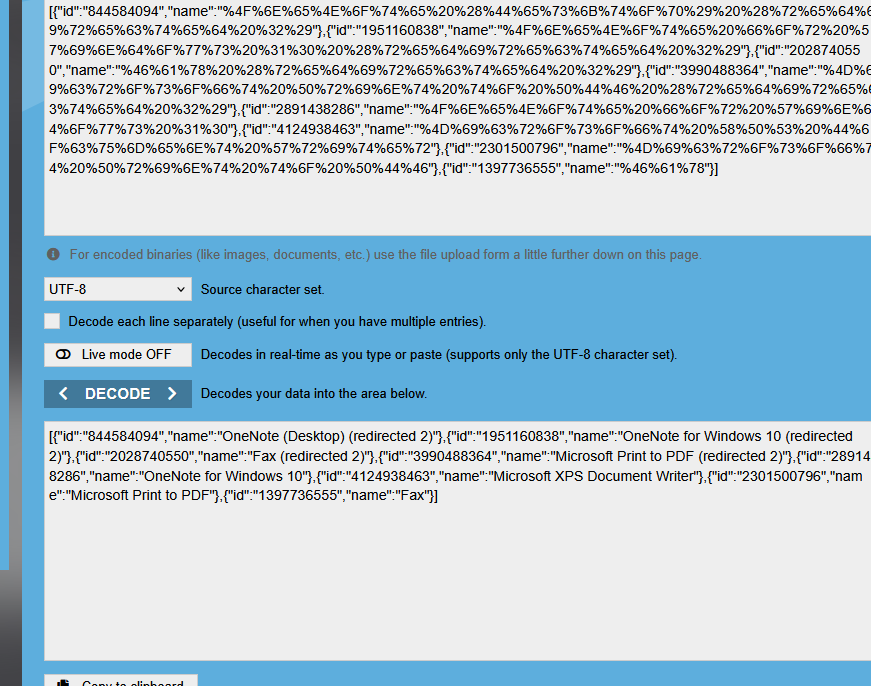
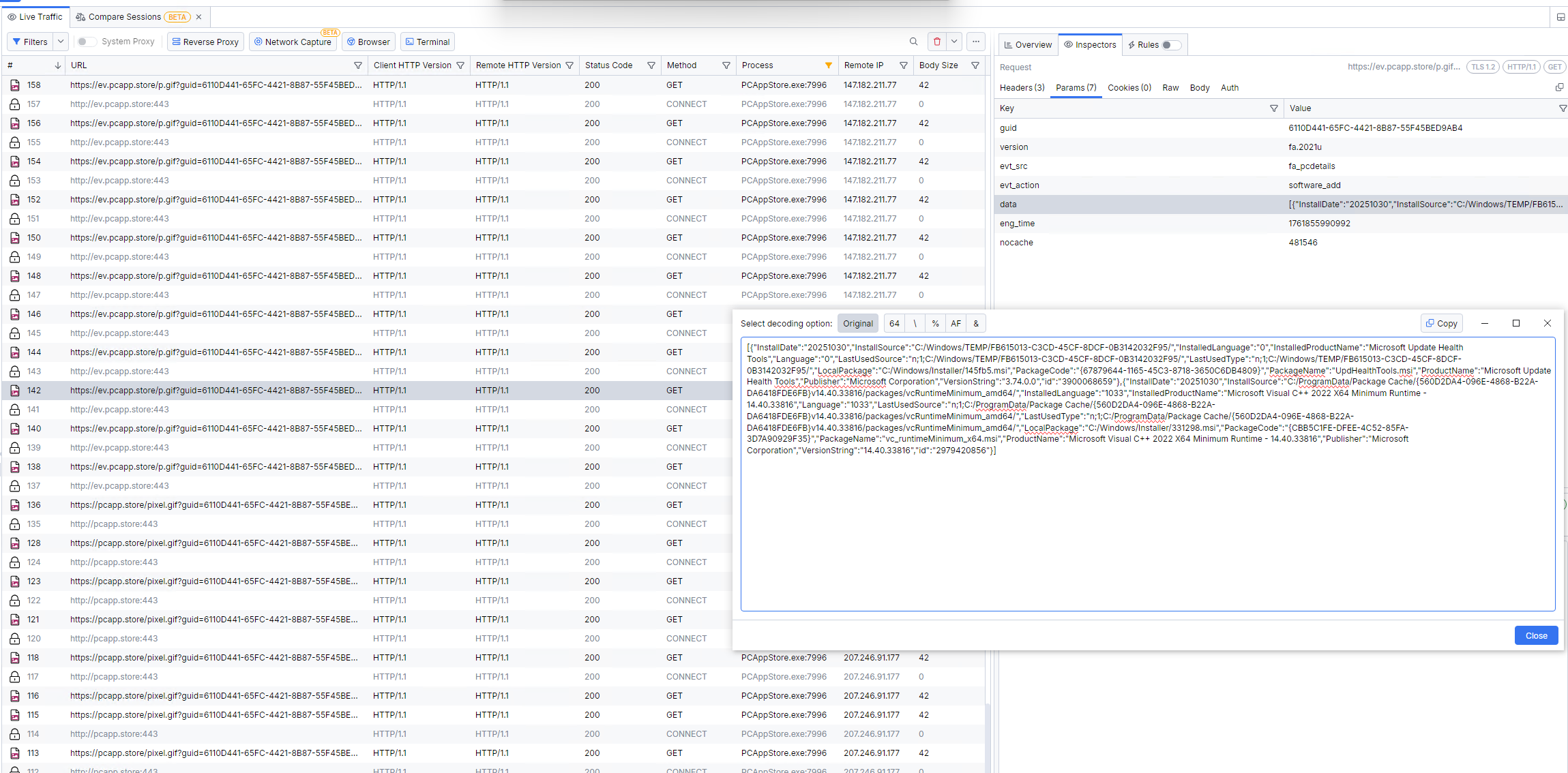 Here we have some Microsoft C++ runtimes and other stuff from Microsoft.
This is pretty much all interesting from the logs. Think about if an alternative application to Microsoft Store needs to see my connected hardware, printers, running processes and their filepaths, browser extensions and other installed software.
Their policies "technical data / specs / performance metrics" are broad enough to cover the above. However, the scope (process lists, full software inventory, device paths) is non-obvious to typical users and exceeds what's reasonably required for an app catalog. Consent is effectively bundled and not granular.
Antivirus detections
PC App Store is often blamed for being an adware/PUP by various Antivirus vendors. From a VirusTotal scan of Setup.exe collected from their official website pcapp.store, we get a malware detection from these known and trusted companies:
- Avast/AVG - NSIS:MalwareX-gen [Adw]
- CrowdStrike Falcon - Win/grayware_confidence_60% (W)
- DrWeb - Program.Unwanted.5544
- ESET-NOD32 - A Variant Of Win32/Adware.VeryFast.Q
- GData - Win64.Trojan.Agent.FBBBM1
- Gridinsoft - PUP.Win32.VeryFast.sa
- Kaspersky - Not-a-virus:HEUR:AdWare.Win32.PCAppStore.gen
- Malwarebytes - PUP.Optional.VeryFast
- Palo Alto Networks - Generic.ml
- Sophos - Fast App Installer (PUA)
Some companies also have their own description of the detection, for example Malwarebytes:
PUP.Optional.VeryFast is Malwarebytes’ detection name for a family of potenially unwanted programs (PUPs) that behave like adware. The programs are published by Fast Corporate LTD.
Source: https://www.malwarebytes.com/blog/detections/pup-optional-veryfast
Riskware/VeryFast is classified as a type of Riskware. Riskware is any potentially unwanted application that is not classified as malware, but may utilize system resources in an undesirable or annoying manner, and/or may pose a security risk.
Source: https://www.fortiguard.com/encyclopedia/virus/8266332
The domain pc-app.store was blocked by Malwarebytes because it is associated with fraud.
Malicious behavior
Websites in this domain mimic legitimate web stores to trick visitors into installing PUPs, adware, and riskware.
Source: https://www.malwarebytes.com/blog/detections/pc-app-store
In multiple downloads, the installer provided binaries whose SHA256 hashes did not match earlier downloads of the same software and same version. Such variance impacts signature based correlation on platforms like VirusTotal or AnyRun and prevents looking the file up.
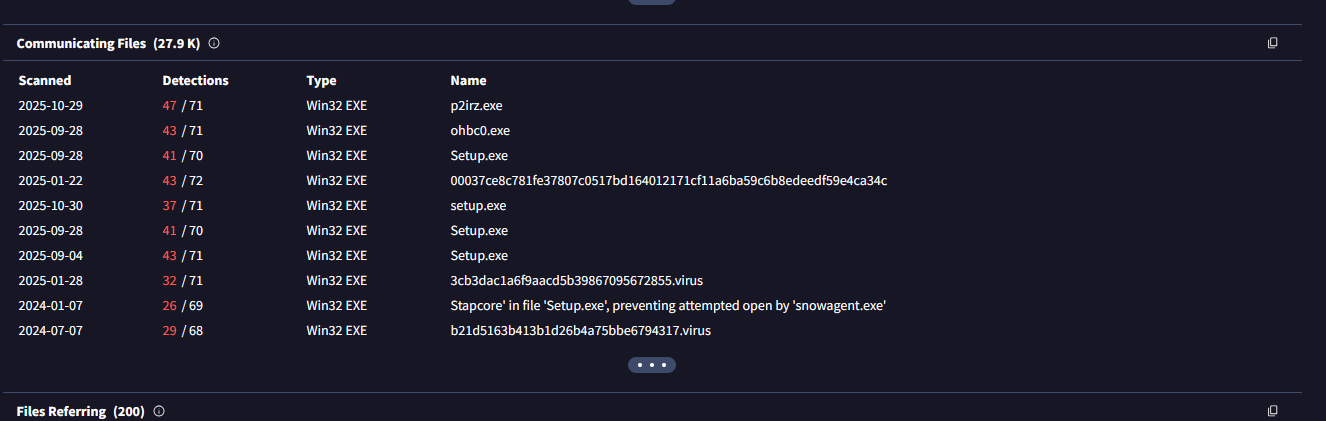
If we take a look at the relations of the pcapp[.]store domain, we can see minimum of 27.9K files communicating with the target domain. This is highly unusual for software installers.
The cherry on the cake is the fact that PCAS meets Deceptor rules (The term "Deceptor" refers to any app or service we believe has violated one or more of our Deceptor Requirements, which we believe include key identifiers of deceptive and risky behavior that could harm consumers) from AppEsteem for the following reasons:
-
ACR-046: App does not show, and provides no option to see, 3rd party app EULA and privacy policy before executing a silent software installation.
-
ACR-107: App does not show its authorization to install 3rd party software
-
ACR-050: App circumvents the ability for consumers to inspect and consent to EULA and privacy of the 3rd party apps it silently installs. Provides no option to get to the EULA/Privacy policies.
-
ACR-097: App evades security investigation by scaring away security review and investigations in its Security Terms and Conditions https[:]//pcapp[.]store/?p=lp_tos_security
The last violation seems rather interesting to me. The deceptor detection was added at 06/05/2025.
False positives... or?
The software creators are very desperate to get their detection removed and consider it as a false positive but that does not happen very often.
Such examples are:
- false positive - veryfast post on Malwarebytes forums
- False Positive "Fast!" (Generic.ml) post on Palo Alto Networks forums
- False Positive Veryfast on Malwarebytes forums False Positive - Pcapp.store on Malwarebytes forums
Every company refuses to remove the detection but PC App Store developers disagree:
Why is my Antivirus saying PC APP STORE™ is unwanted or malicious?
This is a false-positive, wrong detection. It may happen sometimes as protection software use heuristic algorithms. PC APP STORE™ is digitally signed, follows all regulatory and industry guidelines set by legislation and Clean Software Association (CSA). Please let us know about this, so we can handle the issue immediately.
https[:]//pcapp[.]store/?p=lpd_appstore-faq
Now, it is up to you whether you trust malware analysts from the best cybersecurity companies (ESET, Kaspersky, Sophos...) that detect it over the small PCAS software creators.
Feedback from PCAS users
Some reports of people that had PC App Store on their device:
- https://www.reddit.com/r/antivirus/comments/1i7oj3v/if_anybody_knows_how_to_get_rid_of_this_please/
- https://www.reddit.com/r/antivirus/comments/1ekcydg/how_do_i_get_rid_of_this_permanently/
- https://www.reddit.com/r/antivirus/comments/1kveve1/what_is_this_pc_virus/
- https://www.reddit.com/r/antivirus/comments/1loo3ez/fake_mcafee_on_computer/