This guide is primarily oriented towards preventing malware on Windows devices - preventing it from getting downloaded on your device and preventing you from running it. There is a hundred if not more tips I could give in regards to overall safety on the internet involving secure passwords, enabling 2FA, not sharing sensitive information about yourself and more.
This guide is going to be updated regularly. If you want to contribute, do not hesitate to reach out to me on any of my socials listed down in About me with your ideas. :)
A remediation guide for malware can be found in a previous article The ultimate guide to Infostealers: Detection, Recovery and Prevention. This guide is sort of an extended variant to the prevention.
Why should you care about malware?
Malware prevention is important. With the malware capabilities nowadays, it is a necessary step to ensure that your data isn't going to be stolen or your device being negatively affected by malware.
To ensure you understand the possible risks and outcome of being infected by malware (I have experienced cases where people completely disregarded a serious malware infection), some negative impact caused by malware may include:
- Your passwords, saved browser data being stolen and accounts hijacked (infostealer)
- Your device being exploited to mine cryptocurrencies (cryptojacking)
- Your network being exploited, risking drained bandwidth and your IP being linked to criminal activity (proxyjacking)
- Your data - photos, videos, documents being encrypted and therefore inaccessible (ransomware)
- Threat actor having remote access to your device - can cause keylogging, accessing your web camera, microphone, your desktop, filesystem and more (remote access malware)
- Your device being added to a botnet
- Your device being inaccessible -> malware locks it (screenlocker)
Malware also does not fall from trees and it does not suddenly appear on your device. In most cases, it is the users fault that they downloaded and executed malware. This does not apply to supply chain attacks and attacks that do not require interaction (done by remote code execution exploits).
Antivirus software
Antivirus software protects you from downloading and executing malware but it is important to note that no antivirus software will protect you from all the malware that is in the wild. I have seen various malware get past every known AV and multiple times.
While I won't directly recommend a specific antivirus (my opinion is heavily biased and could be controversial), I will list here some free and paid options that are popular, trusted and constantly independently tested. Please do your own research on the antivirus functions, how are other users happy with it, what could be the downsides etc.
Excluding files, URL's, processes or folders
Do not exclude any files, folders, processes or websites, in particular when wanting to run/open something that "requires" you to exclude it. No legitimate software will require you to exclude a file. If you/software developer thinks it is a false positive, it should be solved with the antivirus vendor, not by excluding a file. See False Positive Center on where to contact your antivirus vendor to submit a false positive.
Disabling antivirus, firewall or security software
Do not disable your antivirus software, firewall or other security software at all, in particular when wanting to run something that "requires it". No legitimate software will require you to disable your antivirus. If you/software developer thinks it is a false positive, it should be solved with the antivirus vendor, not by disabling your antivirus. See False Positive Center on where to contact your antivirus vendor to submit a false positive.
How to choose a proper antivirus?
- The antivirus should have been properly independently tested in the past year:
- If the antivirus was not properly tested in the last year or was not tested at all, it raises huge questions about it's effectiveness. Antiviruses are a thing you should not experiment with.
- Independent testing companies:
- You should review it's features for free/paid plans, some popular options may contain:
- Firewall
- VPN
- Password manager
- Identity monitoring, dark web monitoring
- ... other advanced features
- It needs to be an antivirus plan with real-time protection - not just a scanner
- Evaluate it's functionality:
- Does it cause too many false positives?
- Does it have a high detection ratio?
- How heavy is it on my device?
- How intrusive is it when I am using it?
- What operating systems it can cover?
- Evaluate overall user experience:
- What is the price?
- How many devices can it cover?
- What is the experience of others users?
- How do people rate their support?
- Once you decide on a product, try their trial option if they offer one.
"YouTuber" antivirus testing
You may encounter videos on YouTube of people doing "antivirus tests" that looks similar to:
- Having hundreds or thousands of malware samples in a dedicated folder
- Running them with a dedicated program and then the program outputting detection ratio
There are plenty of issues with these tests, some include:
- Malware does not suddenly appear on a system:
- This means that some protection shield (primarily talking about the web protection) was disregarded and ignored in the test.
- A tool automatically executing these files may be behaviourally detected by the antivirus software and may be treated differently for the rest of the test
- This may alter the results of the so-called test, because it will treat the execution tool as malware, so processes ran by the execution-tool may be quarantined/terminated.
- Mostly, only a specific file type of malware is tested - portable executable (EXE) files:
- Malware however comes in many variants - scripts, MSI packages, ClickFix attacks (therefore a script command), drive-by-download, email attachment and more.
- Running XY malware samples at once may overwhelm the system:
- Running hundreds or thousands of malware samples either by hand or with an execution tool is not a realistic scenario. It may alter the results negatively.
- Plenty of these videos are not transparent about configuration:
- An issue is with antivirus configuration. Some antivirus may be misconfigured/protections disabled or altered in a negative way.
- In the past, there was an issue with an unnamed content creator, who conducted a bad antivirus test on an antivirus software, where he unknowingly disabled an important shield which led to negatively altered test results (I am not here to name and shame).
- Plenty of times, the content creator is sponsored by a specific tested vendor:
- Is it truly independent if some of the companies are paying the content creator in order to be shown on video?
Home antivirus lists
Here are some popular options according to independent tests listed above:
Free options
- Windows Defender (preinstalled on Windows 10/11)
- BitDefender Free
- DefenderUI - Significantly improves usability & unlocks many hidden security features of Microsoft Defender
- Harden Windows Security
- Avast Free or AVG Free - both offer same detection engine
- Avira Free
Paid options
- Emsisoft - offers 30 days trial
- Malwarebytes - offers 14 days trial after installation
- Kaspersky - offers 30 days trial
- Sophos - offers 30 days trial
- G DATA - offers 30 days trial
- ESET - offers 30 days trial
Blocking ads
Plenty of malware or unwanted software nowadays comes from malicious ads (malvertising). It isn't very rare for threat actors to pay for Google Ads so their malware delivery website appears high in the Google Search with the sponsored tag.
Sites also often tend to redirect you to malicious websites if they are infected or display malicious ads, which pose a slightly higher risk than if the user used an adblocking software/extension.
You may find adblocking DNS servers, software, browser extensions or even whole browsers. Due to the recent migration of Google Chrome, Opera GX, Microsoft Edge to Manifest V3, these browsers only support a limited version of adblocking browser extensions. These extensions due to their limited capabilites may not block all the ads.
- Browsers with a built-in adblocker:
- Brave (based on Chromium)
- Vivaldi (based on Chromium)
- LibreWolf (based on Firefox) - contains uBlock Origin pre-installed
- Browser extensions (use only 1 at a time):
- uBlock Origin - strongest but unavailable on Google Chrome, Opera GX and Microsoft Edge
- uBlock Origin Lite - based on Manifest V3 API, specifically for Google Chrome, Opera GX and Microsoft Edge, do NOT use if you are on browser that supports Manifest V2
- AdGuard Browser Extension
- Malwarebytes Browser Guard - blocks malicious websites as well
- System-wide adblocking software:
- Router-wide adblocking software (not as effective in some cases):
- DNS-based adblockers (not as effective in some cases):
Security browser extensions
A very popular way to spread malware is via the internet which you can access with a web browser. The extensions listed here block the connection to a known malware delivery websites, phishing or other unsafe/unwanted websites.
Previously, we have talked about adblockers, which in my opinion still remain as the number 1 protection you can have when it comes to browsing on the internet but various malware URL blocking browser extensions deserve to be mentioned here.
Same with antiviruses, you also want to keep only 1 anti-malware browser extension, because there may be detection collisions and performance issues. I recommend you pair it up with an adblocker as well.
- Malwarebytes Browser Guard - Chrome, Firefox, Edge
- Emsisoft Browser Security - Chrome, Firefox, Edge
- Microsoft Defender Browser Protection - Chrome, Edge (enabled by default)
- BitDefender Traffic Light - Chrome, Firefox
- Avast Online Security & Privacy - Chrome, Edge
- AVG Online Security - Chrome, Edge
- Netcraft Extension - Chrome, Edge, Firefox
Secure DNS
A great way to prevent from visiting malicious URL's can be a secure DNS. These DNS servers blocks queries to known malware and phishing websites. It is very simple to set up and does not require any further modifications or settings.
- Cloudflare - blocks malware, phishing and optionally adult content
- OpenDNS - blocks malware, phishing, adult content (also offers customizable filtering after signing up for OpenDNS Home)
- Quad9 - blocks malware, phishing
- AdGuard DNS - blocks malware, phishing and ads, trackers, analytics systems
- ControlD - blocks malware, scams, optionally can block ads, trackers as well
Keep your OS and software up-to-date
A very important tip is to keep your OS and installed software, apps up-to-date. Avoid using outdated operating systems (Windows 10 and below) that do not receive security updates.
You may have an idea of using a paid antivirus instead of updating your OS but that isn't a great idea. With a powerful vulnerability, it is able to go past your antivirus and cause you huge troubles. No antivirus can prevent all vulnerabilities.
This does not apply just to your operating system but also to installed software and applications.
To emphase on how serious it is to keep your software up-to-date, see for example details of the following vulnerabilities in the most popular browsers:
- CVE-2026-3545: Google Chrome RCE Vulnerability - potential full system compromise when users visit malicious web pages
- CVE-2025-14332: Mozilla Firefox RCE Vulnerability - memory corruption vulnerabilities in Firefox and Thunderbird could allow attackers to execute arbitrary code on victim systems through specially crafted web content or email messages
- CVE-2025-21283: Microsoft Edge Chromium RCE Vulnerability - successful exploitation of this vulnerability could allow an attacker to execute arbitrary code with the privileges of the current user, potentially leading to complete system compromise, data theft, and lateral movement within enterprise networks
This doesn't mean that the next site you visit will infect you with an exploit but still, you should do steps to prevent that from happening. The odds of that are still very low but there is still an extremely small chance.
Operating system updates:
Automatic tools to check for updates for software and applications:
- UniGetUI - Windows, macOS, Linux (Recommended)
- Patch My PC Home updater
- UCheck by Adlice
Manual updates for Windows:
Enable auto-update function on your browsers (do note that these are enabled by default):
- Manage Chrome updates (Windows)
- Enable background updates on Firefox for Windows when Firefox is not running
- Brave manual update (automatic is done by default)
Grayware
As gray area software (grayware) we could consider the following type of software:
- pirated software, cracked software
- patches
- spoofers, (hardware) ban bypass software
- keygens
- repacks
- hacking tools (malware builders, backdoor panels)
- software patchers
- injectors and loaders
- macros
- videogame hacks, mods, cheats, exploits or trainers
- hypervisor cracks
- ... in general, any method of obtaining a paid software for free or illegal game modifications
Not all applications/software falling under grayware are malicious but all of them pose a certain risk to the user.
Imagine it in a way that you are running a file that:
- injects processes, modifies files, patches software just like malware
- is a patched version of benign file
- is detected as malware by antiviruses
- is sometimes commercially protected by for e.g. VMProtect or Themida, so you can not determine the file safety properly unless a very complicated and thorough analysis is done
Often, you are also instructed to exclude the file in your antivirus or disable your protections completely. That is a very bad idea.
There are no safe sources you can get pirated software or other grayware listed above from. Just because 100 Reddit users before said they don't see malware on their system after installing it or because it is listed on some list of safe cracks does not mean it is not malicious. Believe it or not, a very large percentage of infections come from pirated software itself or it's websites.
Do I need a VPN against malware?
When it comes to VPN and whether it is necessary for security, the answer is no. It is a tool for privacy, not security.
A VPN encrypts your internet traffic and hides your IP address - making your online activity private from your internet service provider (ISP), hackers on public Wi-Fi (this isn't that big of a risk as it used to be), and advertisers. It can also be used to bypass regional content restrictions (geoblocking).
It is necessary to note that none of those functions protect you directly from malware. A different thing would be if the VPN would be able to filter connections to malicious URL's, which some providers do indeed offer. But that isn't entirely necessary as malware protection DNS servers or antivirus with web filtering can achieve the same.
Free VPN
Free VPN software and browser extensions generally come with many compromises in both security and privacy. There were recorded cases of extensive data collection, deploying proxyware (explained in the Proxyware section) and other unwanted activities to make up for the fact you are not paying for a software that normally costs money.
Unsafe free VPN's include for example (and are not limited to):
- Urban VPN - The browser extension injects scripts to capture AI prompts and responses even when the VPN features are disabled.
- Bright VPN - Bright Data (Bright VPN’s parent company) collects public information from the web for them and pays for your VPN
- Tuxler VPN - TuxlerVPN’s Standard version is free and community-powered. While the app is connected, your device joins the network as a shared node: your residential IP is added to the shared pool, and your connection is used to route traffic for others who have access to the network
If you are really in need of a free VPN, please choose one of the following trusted options:
- Cloudflare One - Free, unlimited
- Proton VPN - Free or paid, both unlimited
- Windscribe - 10GB free, unlimited paid
Here is applied the rule "if the product is free of charge, your data is the payment".
Staying informed with current malware tactics
A very important part of malware prevention is staying up to date with the current tactics threat actors are deploying in the wild.
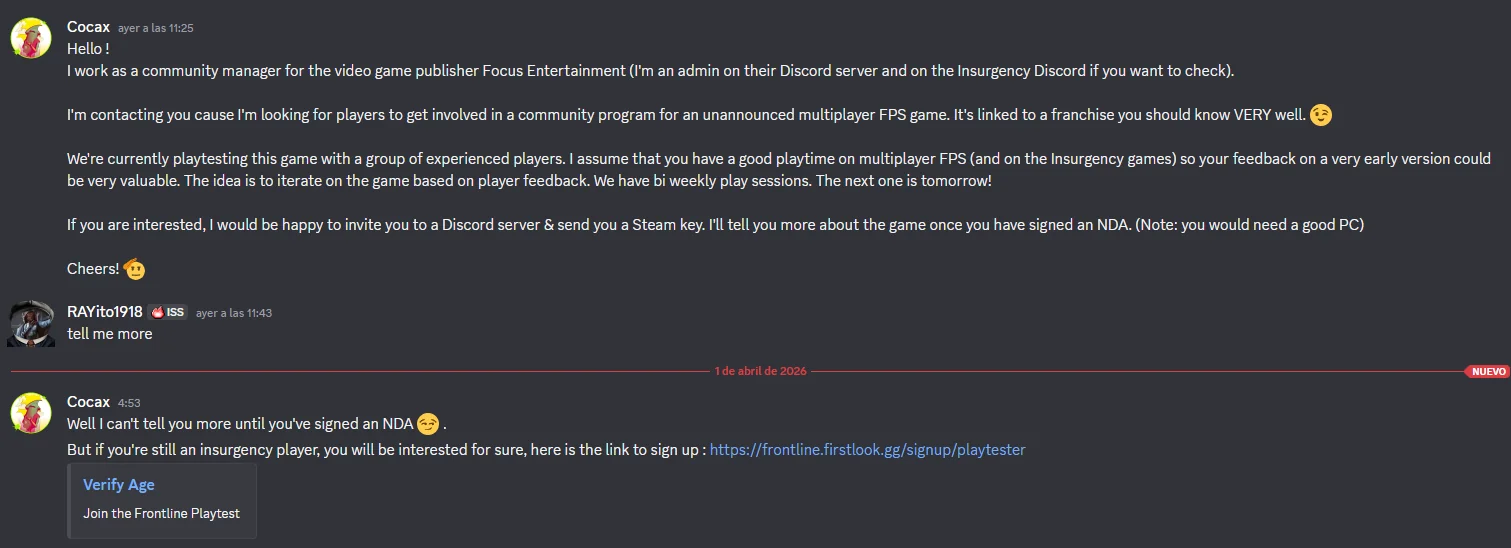
A great example of a malware tactic as of now would be the fake game scam, where for e.g. attackers hijack your friends Discord account and then messages you to try his new game. The game executable is actually a PasswordStealer and your accounts get hijacked soon after opening the game.
.png)
A second example we could consider ClickFix, where attackers try to social engineer you into executing LOLBin (Living-Off-The-Land binaries, for e.g. PowerShell, CMD, cURL) command to load malware from a remote URL. This is often done via a fake captcha, where to proceed you need to verify you are not a robot but the command actually loads malware. It is a common tactic threat actors deploy once they hijack a website administrator credentials.
Where to find new relevant malware intelligence?
A great sources are the following:
- BleepingComputer News
- WeLiveSecurity (ESET)
- Malwarebytes Blog
- BitDefender Blog
- G DATA Security Blog
- SecureList (Kaspersky)
- Huntress Blog
- Rapid7 Malware Blog
- Malware.news
- ANY.RUN Research Blog
- CheckPoint Blog
There are certainly more awesome blogs you can find but those are the mainstream ones from large malware-oriented companies. In general, those are the ones that find out about new tactics, new malware and provide accurate info from experts.
Certain large trends also may be available at multiple of these blogs - I am positive that almost every of these companies at least once wrote about ClickFix.
Checking software for PUP, adware
Checking software installers whether they are PUP (potentially unwanted programs) or adware is not as complicated as checking them for malware. PUP's also are not inherently malicious (so it does not fully fall under the scope of this guide, but still, you should be cautious as some of the PUP's/adware are not that far from being a regular malware) and their removal compared to malware is often way more easier. Some time ago, a fellow malware researcher told me: "The old saying is PUP is malware with a EULA", but I don't think that it is that serious.
Check out my Reddit post AVG installer bundled in tons of software.
Enable your antivirus to detect PUP's, adware
Some antivirus software may have detection of potentially unwanted programs or adware disabled by default.
See for example on how to enable detection or remove PUP by few vendors:
- ESET: Scan and remove Potentially Unwanted Applications (PUAs) for Windows
- Windows Defender: Detect and block potentially unwanted applications
- Malwarebytes: Remove PUP
How to spot a PUP, adware?
Software such as registry/system cleaners, PC optimizers, system repair tools, defragment tools (in the year 2026) also fall under potentially unwanted. In general, system cleaning software is not needed. Windows contains the temp cleanup function themselves and registry optimizers, PC optimizers are misleading.
PUP's or adware can have negative effects, such as:
- Excessive display of ads
- Changed browser new tab page, home page, search engine, bookmarks
- New browser extension, toolbar that you do not recognize (possibly can not be removed as well due to a restriction)
- Sudden redirects to websites you do not recognize
- Additional installation of programs you either consented to (possibly when you accidentally pressed yes when it asked you) or you did not consent to
Prevent PUP's, adware, hijackers
To prevent the installation of potentially unwanted programs, browser hijackers, adware, please follow these rules:
-
Verify that you are downloading from the official & legitimate source
- Avoid third party websites, in particular CNET, Softonic, Download.com are known to bundle adware, PUP's in their software
- Only download from the original software developers website
-
Verify the program is not recognized as unwanted
- Search up the software name, look on it's websites, reputation, whether someone already reported that it caused unwanted behaviour
- Verify it is not present on AppEsteem's Deceptor List, this is a huge list of deceptive and risky applications some antivirus vendors use to classify PUP/adware
-
Before installing, upload it to VirusTotal
- See any detections like "adware", "PUP", "PUA", "potentially unwanted", "potentially unsafe", "HOAX", "Deceptor", "Generic Reputation PUA (PUA)", "Unwanted-Program", "Riskware", "Bundler", "PUABundler", "OfferCore"
- See the dropped files, domains it reaches to. If it reaches out to various other software vendors, it may contain bundled software.
-
While installing, read thoroughly what it is offering you:
- You may find something in the words of by agreeing to our terms you also agree to the installation of xyz, or maybe by pressing yes, you agree to the installation of software xyz
- In the EULA, you can find the outlined abilities and behaviour of the software. It may be worth to read for once (or make your LLM agent read it and tell you the risks :P).
Practical showcase of PUP's
I have decided to download a software that contains a bundler PUP (VirusTotal). When installing, I was prompted 3 times:
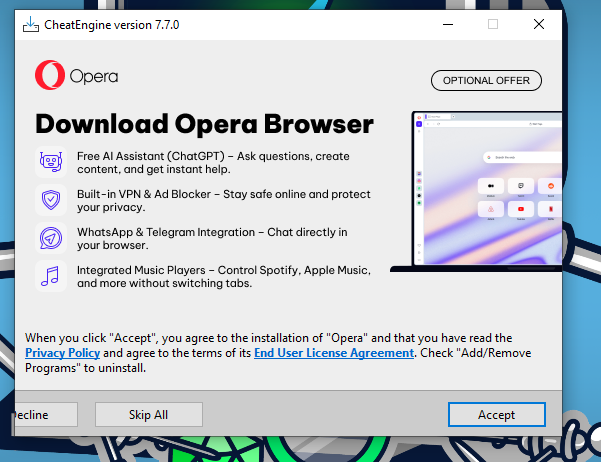
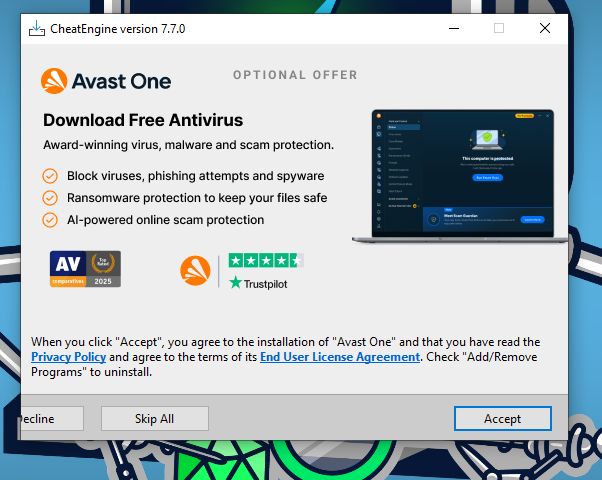
The right answer in every, would be the left button that goes out of the window that says "ecline" (which should be "Decline", if displayed properly, of course).
Proxyware
We have shortly talked about proxyware in the Free VPN section. For software developers, it is a easy and quick way to get their application monetized without intrusive ads.
With proxyware, the malicious traffic goes through your own network and if any abuse is detected (which is not that rare), it will go after you - your device, IP address and it is possible you may get on a low IP reputation list or fraud IP blacklist. In the worst scenario, you may get a not-so-nice letter from your ISP that malicious traffic is going through your network. That really isn't something you want to have on your PC.
There are whole applications dedicated for bandwidth sharing, where you are promised to make some extra money out of it:
- Pawns.app (formerly IPRoyal Pawns)
- Honeygain
- PacketStream
- Cash Raven
- EarnApp
- Income
- Peer2Profit
However, there is malware that brings it along but also legitimate applications that bundle it together. This method is usually mentioned in the Terms of Service or during installation of the program:
In this case, developers from AppSalt put a fairly large warning explained in easy terms for the user (which is how it should have been done in all cases):
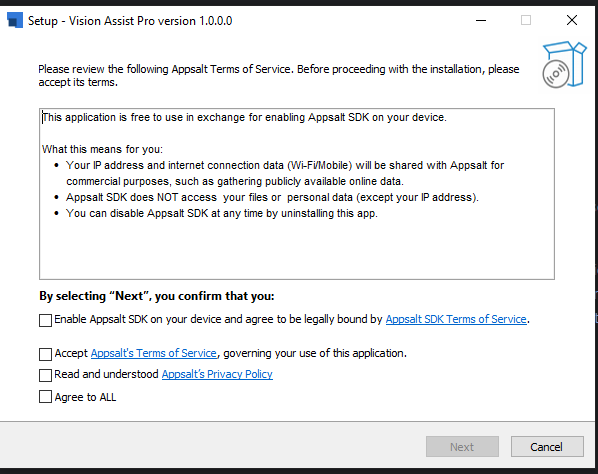
I wish we were able to say the same for the Rave Desktop application, though..
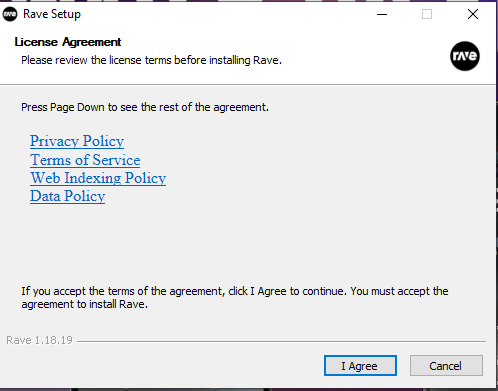
To figure out that this is an application that uses Cash Raven and Honeygain software development kits, we would need to click the "Web Indexing Policy" button.
This stunt that Rave pulled granted them their deceptor flag at AppEsteem and a bunch of antivirus detections for being a PUP/deceptor.
I installed a PUP or adware, how do I remove it?
- Uninstall the program with one of these two:
- Revo Uninstaller - use the free portable version, once in the software select the advanced removal
- Geek Uninstaller
- Bulk Crap Uninstaller
- If your browser is hijacked, reset your browser:
- Run antivirus scans:
- Malwarebytes
- AdwCleaner
- ESET Online Scanner - select the full scan option, enable the detection of potentially unwanted applications and potentially unsafe applications
Checking files for malware
Checking files for malware isn't an easy task. There unfortunately isn't any sort of universal guide that will tell you that the file is malicious or benign.
It is also important to note that malware doesn't neccesarily hide in just .EXE files. All sorts of file extensions (this example list is not limited only to them) can be used to download or load malware, for example:
- Script files - e.g.
.PS1,.BAT,.CMD,.JS,.PY,.PYC,.VBS,.PHP - Dynamic libraries -
.DLL, abused in DLL sideloading attacks - Documents - e.g.
.XLSX,.XLS,.PPTX,.DOCX,.DOC- with macros, vulnerabilities, embedded JavaScript and so on - Shortcuts -
.LNK - Registry editor file -
.REG
We could be here for an eternity listing abuseable file extensions so it is important you stay aware at all times.
Be aware of double extension files, such as document.pdf.exe or harmless_image.jpg.lnk. These are common as well and for this reason you should 100% enable the option to show common file name extensions.
Online sandboxes
Please do note the sandboxes may not always be accurate and may cause either false negatives (file is malware but isn't detected as malware) or false positives (file is detected as malware but isn't actually a malware).
You can certainly find more sandboxes but those are primarily the consumer-available ones that do not require a subscription to access it's basic and necessary features.
Easy to interpret
- VirusTotal (Free) - Scans file with ~70 different antivirus engines and displays verdicts, also offers sandbox results
- Recorded Future Triage™ (Free) - Offers an interactive sandbox to run a file on a hardened Virtual Machine with filesystem, process, registry monitoring and automatic verdicts
- ANY.RUN Interactive Malware Analysis (Requires business/student email or free registration on their Discord server in "authorization" channel) - Offers as interactive, intuitive sandbox to run a file on a hardened Virtual Machine with filesystem, process, registry monitoring and automatic verdicts
- Kaspersky Threat Intelligence Portal (OpenTIP) (Free) - Offers a scanner for complex threats done by the Kaspersky engine. This is more accurate and powerful than the verdict on VirusTotal by Kaspersky.
Harder to interpret
- Hybrid Analysis (Free) - This is a free malware analysis service for the community that detects and analyzes unknown threats using a unique Hybrid Analysis technology. May cause false positives if results are interpreted incorrectly.
- MetaDefender (Free) - Upload any file, URL, IP, or hash for scanning and online malware analysis. Detect ransomware with 20+ antivirus engines, inspect files with the Adaptive Sandbox, and neutralize threats with Deep CDR.
- Filescan.io (Free) - The free community version of Filescan.io is powered by MetaDefender Aether that operates 10 times faster than traditional sandboxes and uses 90% fewer resources. It uses adaptive threat analysis technology to detect evasive malware and extract relevant Indicators of Compromise (IOCs). Our threat-agnostic scanning supports a wide variety of files and URLs to identify IOCs swiftly and efficiently.
Important VirusTotal notes
VirusTotal usage is a little tricky. From my perspective, I see VirusTotal as an awesome tool to give an initial idea (not verdict) on whether the file is malicious or not by telling me what other static antivirus engines think about it.
It is very important to note on the detection tab that:
- The antivirus engines VirusTotal uses may not always be up-to-date
- The antivirus engines don't contain all the engines that the desktop antivirus engine contains (e.g. ESET uses Suspicious Object from it's ESET LiveGrid reputation engine, ESET LiveGuard Trojan from ESET LiveGuard and ML/Augur detections, while VirusTotal does not contain these 3 important engines.)
- Antiviruses are only used as pre-execution scan part. They are equal to you as a user right-clicking the file and pressing "Scan with antivirus xyz". They are not scanned post-execution, therefore every dynamic engine of antiviruses is not displayed in this report
- Every file should be re-analysed to rule out fixed detections or new detection
When are sandbox results irrelevant?
Crypted, packed software
There are some cases where online sandboxes may not be useful. I have already talked in this article about executables that are protected with a commercial packer such as VMProtect and Themida.
VMProtect is included in many commercial software (for e.g. Riot Games Vanguard - a kernel anticheat, see VirusTotal scan). It prevents from various nefarious behaviour, for example:
- attempts to reverse engineer, debug the executable
- attempts to execute it on a virtual machine, emulate or in other monitored environment
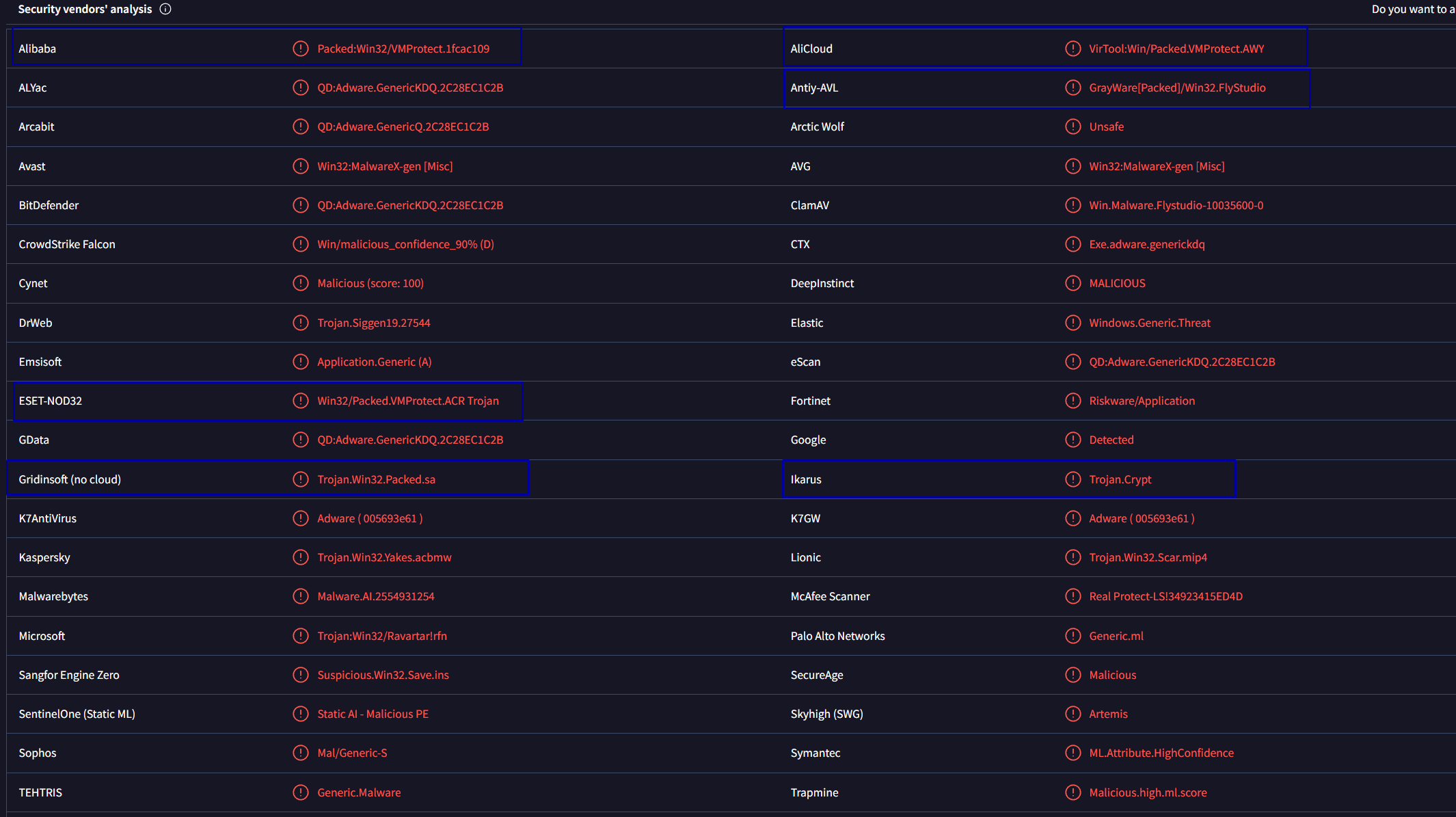
Standard VMProtect'ed executables are highly detected on VirusTotal, see this VirusTotal scan. We can see many detections in regards to crypt, packed, vmprotect, riskware. Applications like Vanguard from Riot Games that we used as an example are 1) validly signed 2) whitelisted with specific vendors to prevent detections on their software.
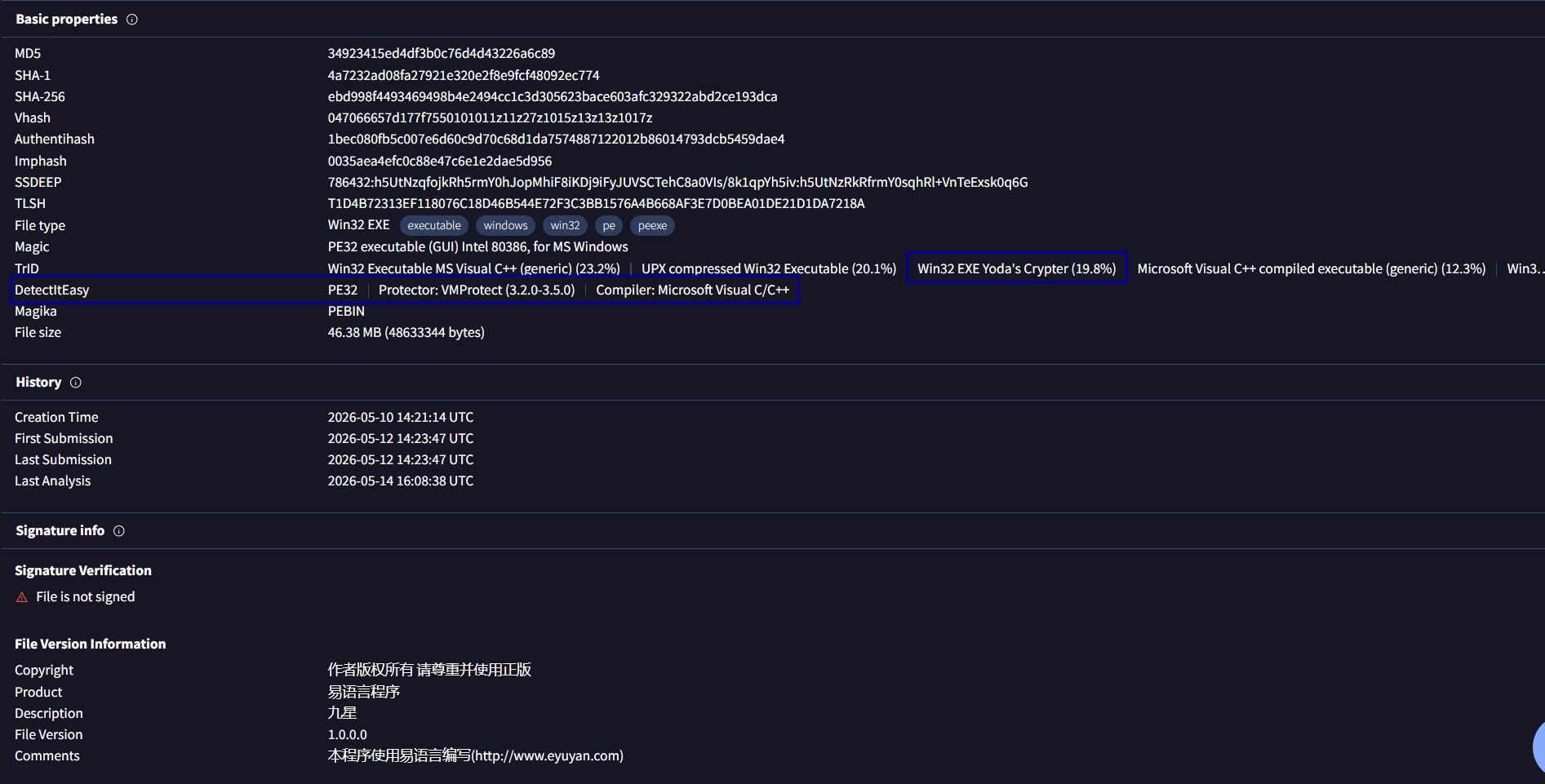
You can see VMProtect not only from detections but also in the Details section and in DetectItEasy and TrID lines. Here actually it is not only VMProtect but "Yoda's Crypter" also in this particular file.
Antiviruses can't safely determine the safety of these packed files so they will display a generic detection for these files. This also applies to other commercial packers, such as Themida, Enigma, Obsidium and many more.
These steps apply primarily to VirusTotal sandbox, however crypted files often contain certain anti-debug, anti-VM mechanisms that will prevent monitoring sandboxes from displaying accurate results.
Here is an example of how Tria.ge identified the executable file we were looking at on VirusTotal:
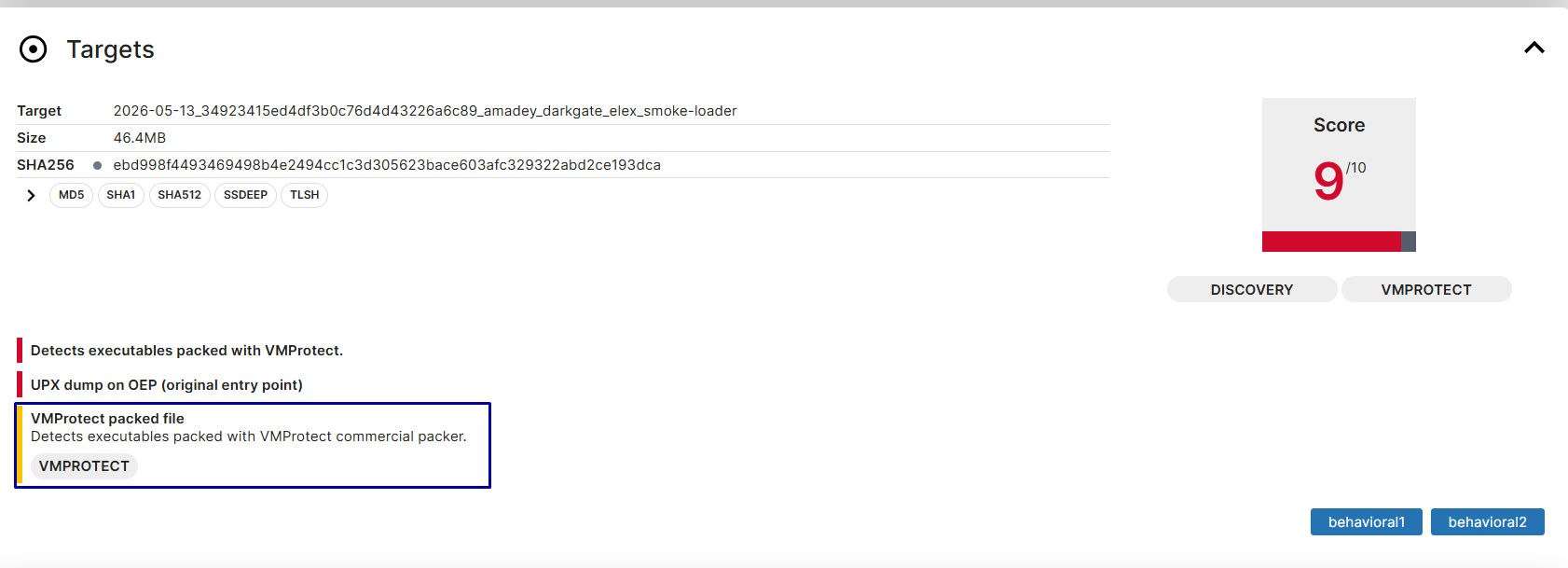
Unfortunately, there isn't a great solution to these. You shouldn't execute these files as you have no guarantee that they are safe.
Anti-debug, anti-analysis, anti-VM mechanisms
An executable that has anti-VM and other anti-analysis mechanisms will possibly behave differently when ran in an online sandbox than on a real machine, e.g. on a real machine it will steal credentials but on a virtual machine it will simply terminate itself.
Threat actors use this tactic against reverse engineers, malware analysts, online sandboxes and antivirus sandbox modules.
An example of an anti-analysis tactic could be intentionally waiting some time before starting it's malicious behaviour. I have observed this for example in previous anyPDF / SystemUtilities backdoor campaigns and in JDownloader's website compromise incident, where threat actors hosted malware that waited 8 minutes until it started decrypting it's malicious payload and loading a Python remote access malware. You can see it in action in this ANY.RUN scan, where at 8:20 it started downloading Python dependencies and loading the RAT.
And as an anti-VM tactic I selected an example from my first article Unpacking a malicious EXE & Node DLL from multi-stage MSI loader, where the sample checked for popular sandbox usernames, computer names and for hardware & disk names used by sandboxes.
If you are downloading an application to play music and on the sandbox it does not seem to start properly - no window is available and the process suddenly terminated or triggered WerFault.exe (the application that reports process crashes), it may be a sign of some form of sandbox evasion.
Back to our Yoda Crypted sample, we can see it in the Behavior tab:
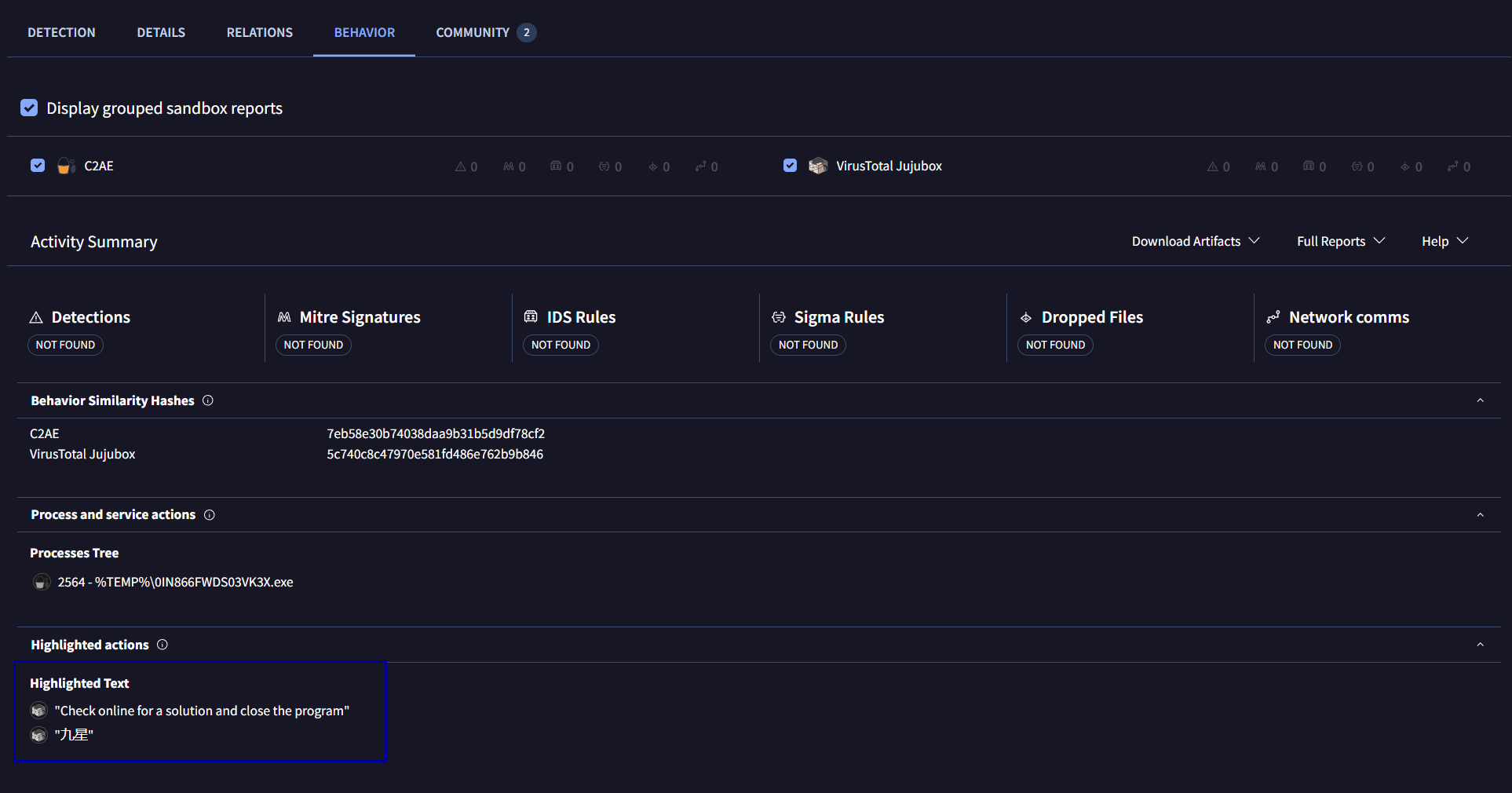
Sometimes there is also in process tree visible the WerFault.exe process, which is another indication that the program contains anti-VM tactics and did not execute properly.
It is important to note that this point applies to every online sandbox out there. Online sandboxes are constantly updated to pass those anti-VM tactics, however at some point you'll probably face a malware that evades your sandbox.
A way to deal with those would be to upload them on multiple online sandboxes and compare the results of each:
- Are the process trees, file modifications, registry modifications identical on each?
- Is there any other behaviour happening on one of the sandboxes?
Either way, you should still proceed with caution. A regular software generally does not usually try to detect a sandbox/virtual machine, unless it is a legitimate game with an anti-cheat, where anti-VM and anti-analysis tactics are quite normal.
Incomplete file structure
An another case where the analysis can not be considered valid is when the file structure is incomplete.
Consider a scenario where you want to analyse a file that contains multiple DLL's, executables and other files. To get a proper sandbox results, you would need all of the files on the target sandbox exactly like it is distributed and run it through the entry executable. If you do not collect all the necessary files, the executable will crash or behave in a way that isn't standard.
However, on VirusTotal you can not get the proper analysis. Of course, you could upload them separately but that does not guarantee the integrity of the analysis. The solution to this would be to upload the whole archive of the files needed to run it on an interactive sandbox like ANY.RUN or Tria.ge and execute from there.
Checking websites for malware
SEO Poisoning
A large part of malware nowadays comes from the internet. If you do not download from low reputation or illegitimate URL's, the large part of the malware can be avoided.
Be aware of fake websites imitating the legitimate one. Because of SEO (Search Engine Optimization) poisoning this is a real threat. You search a keyword or the software name (e.g. WinRAR) but the first website in the search is a malicious clone. Naturally, you would choose the highest ranked one as it is a form of credibility.
This can also be done via Google Ads - they pay for ads that will make them appear higher than the legitimate service in Google search. The remediation here is to use an adblocker and verify websites you are downloading from on multiple independent sources; various tech forums, Reddit or other sources that mention this source means it will be more likely benign and verify the URL with the services linked below in the article.
Can opening a website infect me?
In general, it is very unlikely for malware to download and execute just by clicking part of a website, an ad or simply opening a website regardless of what platform you are on (Windows, Mac, Linux, Android, iOS...).
It is important to determine what do we mean by:
- download - application gets downloaded on the system but not executed
- executed - equal to running, double-clicking, starting an application
Browsers are heavily sandboxed and by default only the download part is possible to happen, not execute. That still does not mean you should go around and clicking every link like you were paid for it. Please don't do that.
However, it is possible to execute malware without user interaction by abusing vulnerabilities in your browser. Those are however very rare and we already talked about them.
Services to check links for malware
Non-antivirus vendors
- URLScan (Free) - Advanced URL scanning service
- Sucuri SiteCheck (Free) - Offers advanced scan of scripts loaded on the site; this can ultimately sometimes detect malicious URL's more effectively than other services
- ANY.RUN Interactive Malware Analysis (Requires business/student email or free registration on their Discord server in "authorization" channel) - Offers advanced and automatic URL scanning; links are also scanned with SURICATA
- VirusTotal URL Scan (Free) - Displays verdict of ~90 security companies on an URL, can cause false positives (instance where website is incorrectly detected as malicious
Antivirus vendors
Note: the individual link checking websites of antivirus vendors may be more accurate in the verdict than in VirusTotal
- BitDefender's Link Checker (Free) - Offers BitDefender's engine to determine URL safety
- ESET Link Checker (Free) - Offers ESET's engine to determine URL safety
- NordVPN Link Checker (Free) - Offers NordVPN's antivirus engine to determine URL safety (questionable as NordVPN antivirus hasn't been properly independently tested)
- F-Secure Link Checker (Free) - Offers F-Secure's engine to determine URL safety
- Kaspersky OpenTIP (Free after registration) - Offers Kaspersky's engine to determine URL safety
- Norton SafeWeb (Free) - Offers Norton's reputation engine to determine URL safety
- Dr. Web Online Scanner (Free) - Offers Dr. Web's engine to determine URL safety; checks individual loaded scripts as well
Check browser extensions for malware
We talked about files, URL's and now it's time to talk about browser extensions. Surprisingly, browser extensions are also a popular vector for malware.
While browser extensions are limited to the browser itself, they still remain a very powerful tool when in the wrong hands. A malicious extension can hijack your browser, display you fake popups (that can lead into a ClickFix social engineering attack to privilege escalation from browser to the host system) and intercept your site requests.
Avoid user-script manager extensions
These browser extensions are considered as risky, as the misuse of these can cause the execution of malicious userscripts.
Consequences of running a malicious userscript may be for example:
- causes your browser data being stolen and sent to attackers server
- web traffic being intercepted and sent to attackers server
- adware, redirects, popups, browser hijacking
There was a recorded case of an adware utilizing Tampermonkey to deploy adware (Opera Blacklists Tampermonkey Extension Being Installed by Malware).
An example of a user-script manager extensions can be:
- Quillmonkey
- Robomonkey
- ScriptCat
- Tampermonkey
- Violentmonkey
- Greasemonkey
- ... and more
Tools to check browser extensions
- CRXplorer - AI-powered tool to determine risks, capabilities of extensions
- Robwu.nl - View extensions source code
- Chrome Malicious Extension Listing - Contains a list of known malicious Chrome browser extensions
General tips for browser extension malware
- When downloading a browser extension, please make sure:
- It has enough users (>500000 preferably)
- It has enough ratings and positive ratings (>4.0 stars)
- Manually verify each comment to see if users mention browser hijacking, data collection or other unwanted behaviour
- Verify that the extension is not mentioned in any of malicious lists; this can be done by searching the extension ID (e.g. ProtonPass has ID
ghmbeldphafepmbegfdlkpapadhbakde) - Inspect it's source and test it with a tool listed above
- Search the extension name on Google and check for any malicious behaviour mentions of it
Thank you for reading my guide!
-
Update (01/06/2026): fixed DefenderUI link, grammar fix, added Harden Windows Security
-
Update (20/06/2026): added sections "Excluding files, URL's, processes or folders", "Disabling antivirus, firewall or security software" and "Avoid user-script manager extensions", added whole section of PUP/adware
-
Update (23/082026): added Free VPN, Proxyware sections, fixed formulations, added UniGetUI as recommended update tool